PyCharm & CLion application fonts are italicized
已回答

My PyCharm & CLion application fonts seems to have been changed to something italics. That means the menus, the Project navigation window, etc. It does *not* seem to include the editor.
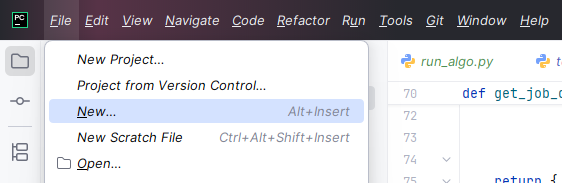
PyCharm Version: 2025.2.3

CLion Version: 2025.2.3
Any thoughts on how to fix this?
请先登录再写评论。
Hello, Jonathan Fisher ,
In general, the default font is Inter. Does it help, if you set the required font under File | Settings | Appearance & Behavior | Appearance?
This is interesting. I recently installed this font to my system completely separately from this (it's a corporate font used) - I installed the OpenType font file. In Windows 11 Fonts, the font looks OK:
Here is what the settings screen looks like:
When I switch the font to “Use custom font”, it looks the same (even after restarting the IDE):
When i change it to something else, it looks OK:
In Word, the Inter font looks OK:
Any thoughts on how to debug this?
Thank you,
Jonathan
Hi Jonathan,
The issue appears to be the same as https://youtrack.jetbrains.com/issue/IJPL-176432 - when a font with multiple variations is installed in the system, and it also happens to be used by the IDE as a default font, IDE may erroneously select a non-regular font variation from that font's family.
The workaround for now is to either remove all variations of the font from its installation, or uninstall it from the system completely as you did.
You are welcome to upvote the ticket and follow it for updates.
Thank you - unfortunately that link doesn't work:
Sorry, there was an extra colon character in the link. I removed it, so you can try again.
Huh wow I missed that - thank you for linking it! How can I resolve this thread?
I marked the thread as answered, all good 👍🏻