How do I disable this Find/Replace / Replace in Files pop-up that's constantly getting in the way?

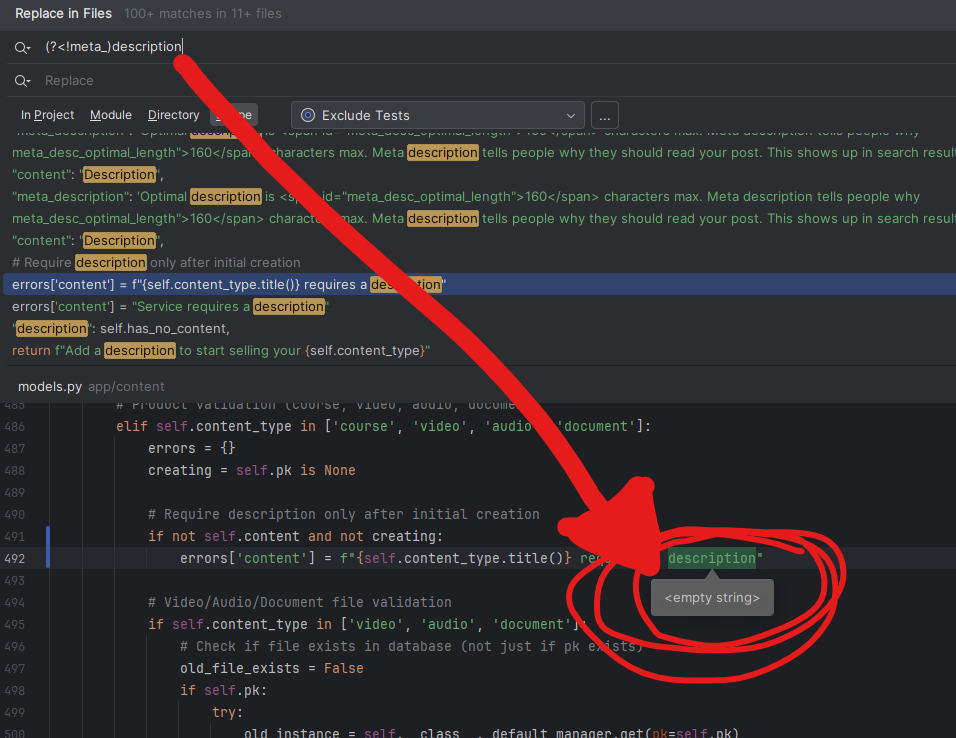
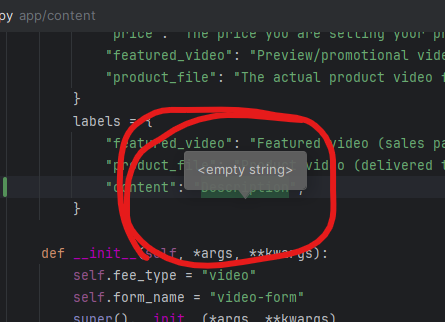
How do I disable this pop-up (popup) for find / replace? It's constantly getting in the way and blocking the thing I'm trying to read.
0
Hi Jarad, 

Thank you for raising this. Can you check if this guide is of help? https://www.jetbrains.com/help/idea/viewing-reference-information.html#quick-doc-in-tool-window
Waiting for your output.
0

Hi Petru,

Thanks for taking a look. I don't think it's a CTRL+Q issue that can solve it, but I could misunderstand. What I noticed is, to recreate this, you have to use the “Replace in Files” WITH the regex “.*” filter on. Search for something really common in your project but use the regex search option. The box (if it pops up for you too) is what I am referring to.

0
Hi, 

Thank you for confirming. Unfortunately we couldn't reproduce this behavior. 
Can you please perform the following below?

1. Enable UI Inspector: https://plugins.jetbrains.com/docs/intellij/internal-ui-inspector.html
2. Open Find/Replace → run UI Inspector on the popup → put the mouse cursor on the popup and press Ctrl/Cmd+Alt while clicking the mouse.
3. In the Inspector, Copy All properties and send them to us.
0

Hi,

Cool tool! One point of clarification of why it might not have worked for you - you need to be doing a Find/Replace so CTRL+SHIFT+R, then make sure the regex search filter is set. Just in case I didn't make that clear.

MyComponent

class: com.intellij.ui.BalloonImpl$MyComponent@1165552530
declaringClass: com.intellij.ui.BalloonImpl
hierarchy: com.intellij.ui.jcef.HwFacadeJPanel → javax.swing.JPanel → javax.swing.JComponent
dialogWrapperClass: com.intellij.find.impl.FindPopupPanel$2
ui: javax.swing.plaf.basic.BasicPanelUI@6c609c97
location: 206:462
locationOnScreen: 695:580
size: 146x98
opaque: No
border: EmptyBorder insets={top=24 left=24 bottom=24 right=24} (javax.swing.border.EmptyBorder@13190ab1)
foreground: r:223 g:225 b:229 a:255 argb:0xFFDFE1E5 UIResource name: UI Resource: Panel.foreground
background: r:43 g:45 b:48 a:255 argb:0xFF2B2D30 UIResource name: UI Resource: Panel.background
font: Inter Regular (Inter), 13px UIResource
minimumSize: 146x98
maximumSize: 32767x32767
preferredSize: 146x98
toString: com.intellij.ui.BalloonImpl$MyComponent[,206,462,146x98,alignmentX=0.0,alignmentY=0.0,border=javax.swing.border.EmptyBorder@13190ab1,flags=16777217,maximumSize=,minimumSize=,preferredSize=]
visibleRect: 146x98 @ 0:0
layout: -
alignmentX: 0.5
alignmentY: 0.5
toolTipText: -
cursor: -
showing: Yes
enabled: Yes
visible: Yes
doubleBuffered: Yes
focusable: Yes
focusCycleRoot: Yes
focusOwner: No
valid: Yes
displayable: Yes
lightweight: Yes
clientProperties: [TEXT_COPY_ROOT->true],[Balloon.property->com.intellij.ui.BalloonImpl@487640e],[layeredContainerLayer->300]
mouseListeners: -
focusListeners: com.intellij.openapi.wm.FocusWatcher
baseline: -1
added-at: -
accessible: Yes
accessibleContext: javax.swing.JPanel$AccessibleJPanel@4f575c0a
  class: javax.swing.JPanel$AccessibleJPanel@1331125258
  declaringClass: javax.swing.JPanel
  hierarchy: javax.swing.JComponent$AccessibleJComponent → java.awt.Container$AccessibleAWTContainer → java.awt.Component$AccessibleAWTComponent → javax.accessibility.AccessibleContext → java.lang.Object
  accessibleRole: panel
  accessibleName: -
  accessibleDescription: -
  accessibleAction: -
  accessibleParent: com.intellij.openapi.ui.impl.DialogWrapperPeerImpl$MyDialog$DialogRootPane$1[null.layeredPane,1,1,1003x764,alignmentX=0.0,alignmentY=0.0,border=,flags=0,maximumSize=,minimumSize=,preferredSize=,optimizedDrawingPossible=false]
  accessibleChildrenCount: 1
  accessibleIndexInParent: 1
  accessibleRelationSet: 
  accessibleStateSet: enabled,focusable,visible,showing
  accessibleEditableText: -
  accessibleTable: -
  accessibleText: -
  accessibleValue: -

JPanel(myContent@MyComponent)

class: javax.swing.JPanel@706641252
hierarchy: javax.swing.JComponent
dialogWrapperClass: com.intellij.find.impl.FindPopupPanel$2
ui: javax.swing.plaf.basic.BasicPanelUI@6c609c97
location: 24:24
locationOnScreen: 719:604
size: 98x50
opaque: No
border: EmptyBorder insets={top=5 left=8 bottom=5 right=8} (javax.swing.border.EmptyBorder@40b12536)
foreground: r:223 g:225 b:229 a:255 argb:0xFFDFE1E5 UIResource name: UI Resource: Panel.foreground
background: r:43 g:45 b:48 a:255 argb:0xFF2B2D30 UIResource name: UI Resource: Panel.background
font: Inter Regular (Inter), 13px UIResource
minimumSize: 98x50
maximumSize: 2147483647x2147483647
preferredSize: 98x50
toString: javax.swing.JPanel[,24,24,98x50,layout=java.awt.BorderLayout,alignmentX=0.0,alignmentY=0.0,border=javax.swing.border.EmptyBorder@40b12536,flags=16777217,maximumSize=,minimumSize=,preferredSize=]
visibleRect: 98x50 @ 0:0
layout: java.awt.BorderLayout[hgap=2,vgap=2]
alignmentX: 0.5
alignmentY: 0.5
toolTipText: -
cursor: -
showing: Yes
enabled: Yes
visible: Yes
doubleBuffered: Yes
focusable: Yes
focusCycleRoot: No
focusOwner: No
valid: Yes
displayable: Yes
lightweight: Yes
clientProperties: -
mouseListeners: -
focusListeners: com.intellij.openapi.wm.FocusWatcher
baseline: -1
added-at: -
accessible: Yes
accessibleContext: javax.swing.JPanel$AccessibleJPanel@2ab85980
  class: javax.swing.JPanel$AccessibleJPanel@716724608
  declaringClass: javax.swing.JPanel
  hierarchy: javax.swing.JComponent$AccessibleJComponent → java.awt.Container$AccessibleAWTContainer → java.awt.Component$AccessibleAWTComponent → javax.accessibility.AccessibleContext → java.lang.Object
  accessibleRole: panel
  accessibleName: -
  accessibleDescription: -
  accessibleAction: -
  accessibleParent: com.intellij.ui.BalloonImpl$MyComponent[,206,462,146x98,alignmentX=0.0,alignmentY=0.0,border=javax.swing.border.EmptyBorder@13190ab1,flags=16777217,maximumSize=,minimumSize=,preferredSize=]
  accessibleChildrenCount: 1
  accessibleIndexInParent: 0
  accessibleRelationSet: 
  accessibleStateSet: enabled,focusable,visible,showing
  accessibleEditableText: -
  accessibleTable: -
  accessibleText: -
  accessibleValue: -
BorderLayout constraints: hgap - 2, vgap - 2
Wrapper: Center

And so on.

0

After researching, it sounds like the answer is:

You can’t hide that popup when using regex in PyCharm; it’s built into the Find in Files UI. The easiest way to avoid seeing this popup is to not use the regex filter in a find/replace action (if it's getting in the way for you).

Is that accurate? I mean, my feedback would be, “I would like to be able to use regex find/replace without the balloon popup getting in the way… but..” I guess if it's built-in like this, nothing can be done.

End of the world? No.

A big deal? Not even close.

I was just hoping there was an easy way to disable it :)

If you know of a way, I'd love to hear how!

0
Hi Jarad,

Thanks for sharing the requested data.
You’re correct — at the moment, there’s no way to dismiss those popups. I’ve submitted a feature request in YouTrack to address this: IJPL-213805 – Option to disable Find/Replace balloon popup (https://youtrack.jetbrains.com/issue/IJPL-213805/Option-to-disable-Find-Replace-balloon-popup).


Please consider voting for it to help prioritize the request in our backlog.


Best regards,

Petru Basarab
IntelliJ Platform
1

Petru Basarab Thank you for creating a well written feature request about this issue, and for all your assistance. I really appreciate it. Take care.

0

请先登录再写评论。