Update procedure is broken

For a couple of EAP releases IDEA's built-in update procedure is very broken for me.
First of, when I choose “Check for updates” from the start screen, I get no feedback for about 30 seconds.
(When during this time, I invoke “Check for updates” again, thing go even more wrong afterwards.)
Then, when I get this notification 
I click on "Update…", then “Update and restart”,
then select all plugins here
and click on “Update” again (4th time?!) IDEA procedes to download plugins:
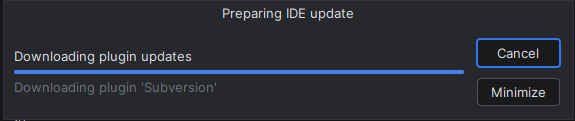
after I confirm the update and IDEA restarts I end up with this
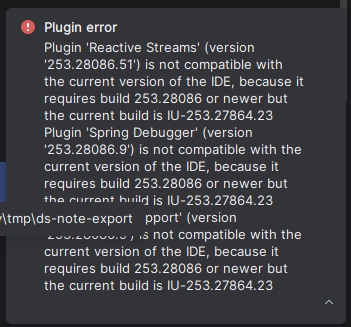
NOTE: I have edited <idea-installation-folder>/bin/idea.properties and have reconfigured `idea.config.path`, `idea.system.path`, , `idea.plugins.path`, and `idea.log.path` to point to folders specific to 2025.3, so that I can run an older IDEA version in parallel.
So far that always worked fine.
请先登录再写评论。
Thanks for the feedback.
> First of, when I choose “Check for updates” from the start screen, I get no feedback for about 30 seconds.
(When during this time, I invoke “Check for updates” again, thing go even more wrong afterwards.)
Your issue should be the same as https://youtrack.jetbrains.com/issue/IJPL-213439/No-progress-indicator-in-the-status-bar-after-using-Help-Check-for-Updates.
This issue is fixed in the 2025.3 EAP 8. Please try it.
I have created two related bug reports and plan them to fix in a future release.
https://youtrack.jetbrains.com/issue/IJPL-217184/ (IDE shows to update plugins to the same versions when updating the IDE)
https://youtrack.jetbrains.com/issue/IJPL-217193 (The IDE tries to download each plugin update twice when updating the IDE)
> after I confirm the update and IDEA restarts I end up with this
Could you please share IDE logs from IDE main menu `Help | Collect Logs and Diagnostic Data` for investigating this issue?
After getting the log, you could upload it into https://uploads.jetbrains.com/ and share us the upload id.
Still not working: I tried to update from 2025.3 Beta (253.28294.169) to IDEA 2025.3 RC.
In the first update attempt a lot of plugins got updated, but the IDE is still the old version.
I invoked the update procedure again, and IDEA shows that these 3 plugins need an update:
Interestingly, when I deselect the three plugins the Update button is grayed out and I can only cancel the complete update. I can't just ignore the plugins and proceed with the IDE update.
When I keep the plugins selected and click on Update, IDEA shows a “Preparing plugin updates” and downloads the updates, but then fails with
After that I can click on Restart and nothing changed at all. The same three plugins still needs updates, the IDE is still old.
…
Oh, finally, I noticed that when I click on “Ignore” in the dialog that asks me to Restart after the failed plugin installation, then IDEA proceeds with the update to the IDE itself.
And after that update, the plugins also seem to be up-to-date.
I hope that from this version on, the updates work again!
We fix these issues in 2025.3 RC, so you would still have these issues when updating from 2025.3 Beta to RC.
But this issue won't happen if you update 2025.3 RC to a newer version.
If you still see any issues when updating 2025.3 RC to 2025.3 release later, please let me know.