gradle tab does not show
已回答

Hi, I just updated intelliJ and now my gradle tab does not show anymore…It is just empty…
请先登录再写评论。
I tried
* deleting all other jdks (only leaving jdk25). still Intellij refers to 21!
* remove and new Install of IntelliJ (3 times, 3 different pathes)
* delete all local caches (.idea, .gradle, pp)
* “Repair” from within IntelliJ
* Deleting all local source and re-downloading the former working source from github
* unsub from the professionell trial from within IntelliJ
Nothing worked and nothing brings the gradle tab back
I can not find the former version of IntelliJ (when there was NOT the combined version)
Hello Impetus / Indu
Could you please verify your Gradle plugins are up to date:
Then try opening the Gradle tab from Search Everywhere?
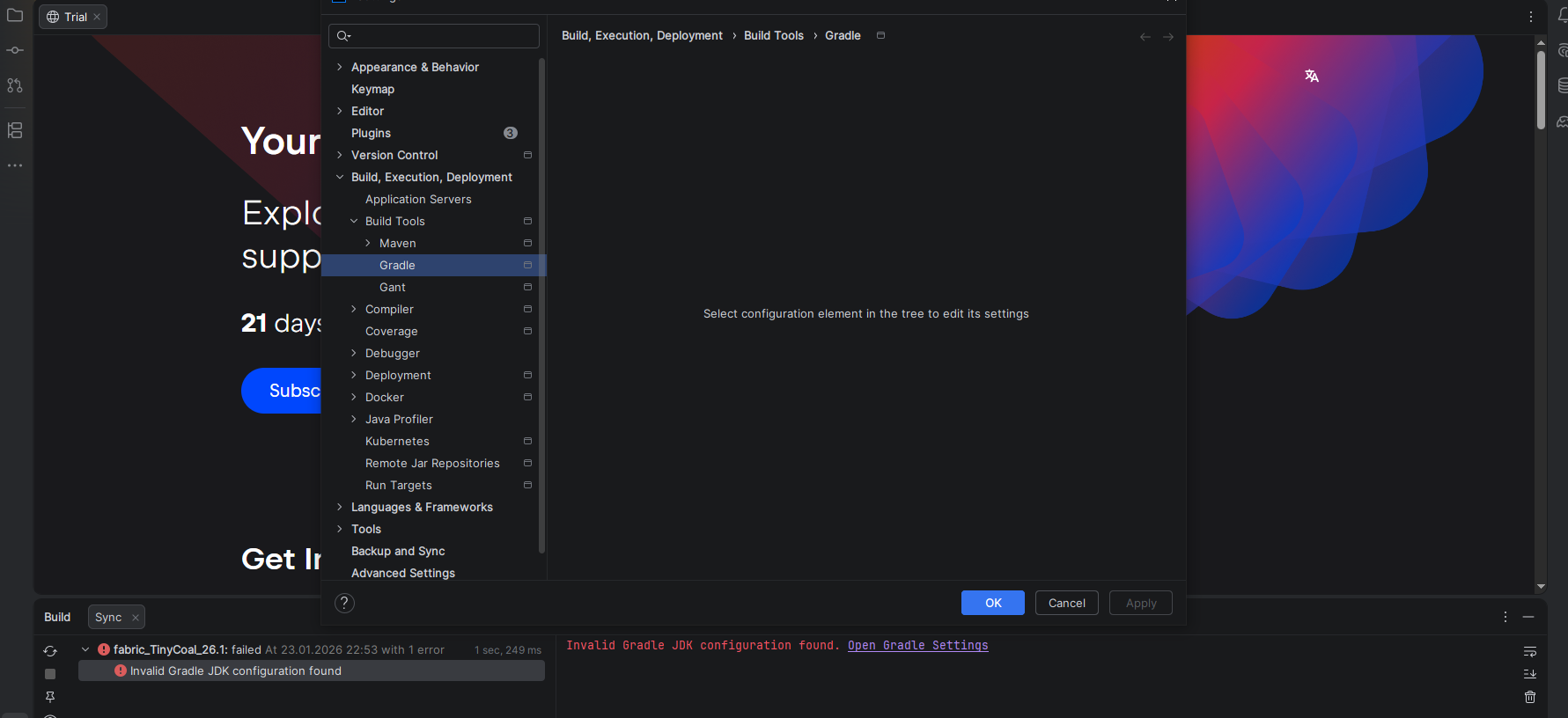
ShiftIf the tab is not open, please share the current screenshots of Settings | Build, Execution, Deployment | Build Tools | Gradle, Settings | Advanced Settings | Build Tools.Gradle, File | Project Structure | Project, File | Project Structure | Modules, File | Project Structure | Libraries, and File | Project Structure | SDKs.
Also, right after calling the Gradle tab, collect the logs by going to Help | Collect Logs and Diagnostic Data, then attach the zip file here or via our secure upload site https://uploads.jetbrains.com/, and share the uploadID for further review.
You are my light in the dark!
If I messed some up, please let me know and I deliver the missing
this is the zip right after selecting the gradle tab on the right
upload id → 2026_01_26_knmr9f5SKYxAx4PCbQz4MT
Hi Impetus / Indu
Thanks for the screenshots and log. I reviewed them and found that the root cause is most likely the IDE trying to use the JAVA_HOME environment variable as the Gradle JVM, but it could not properly validate or resolve it as a valid JDK for Gradle operations. The error pointing to it is below:
Also, there is a mismatch between your JDK defined in the system and the one used in your project, as seen in the screenshot. You have configured JDK 25, but the system's JAVA_HOME points to 21; also, this simple mismatch could be the cause of the problem. Please try removing JAVA_HOME and let me know if that resolves the issue.
removed JAVA_HOME
reboot
still gradle tab is empty
which makes sense because when I was updating to new version,
JAVA_HOME was pointing correctly to JDK21 (which was still installed and needed for older projects)
in community edition showed java version to use on gradle tab (if i remember right) and I could switch between 21 and 25
new zip from just now (no JAVA_HOME) → 2026_01_27_jqXc9duuMsSqFPmR9QNDwg
I think ItelleiJ should always show the tab… like the community version did…
old view…
if only I could access “Gradle JVM”
* re-installing IntelliJ does not help
* deleting “.idea” does not help
Hmm, what am I doing wrong? It seems to work for others?
I need to go for a walk to get my head clean. Maybe I have another idea what to change
Does the old community version really have issues with java 25 or is that marketing to push the new IntelliJ?
I would like to ask the UI gradle developer for ONE reason NOT to show the gradle config window!
Most kind of answer I got in 20 year of Java IT PM: “The customer is doing it wrong. On my PC it works!”
yeah, maybe I AM doing it wrong but how the <piep> do I crawl out of my self set trap? :D
Dear Monica, I hope you find something! thanks and cheers, thomas
Hi Impetus / Indu
I'm sorry that the current suggestions haven't worked for you. I'm also looking for the root cause, but I need to go through the steps to discard probable causes and review the new logs more carefully.
Meanwhile, please try creating a new simple Hello World example with Gradle and check whether the Gradle settings are shown for that project.
An important question: are you just opening the existing project, or reimporting it via File | New | Project from Existing Source, selecting the folder, and choosing Import project from external model → Gradle, then following the wizard?
If not, please do the whole regenerating process for the project:
Please let me know the result of both actions.
Hi again Impetus / Indu
I got the root cause of your issue! So please omit the last message.
Looks like there's a problem with your PATH variable: two paths are accidentally concatenated (C:\Users\tommy\AppData\Local\Microsoft\WindowsApps, C:\php72), and the resulting string contains an illegal character (a comma in this case), which is not allowed in Windows file paths. This causes an
InvalidPathExceptionand prevents certain UI components (such as settings panels) from loading.So please check your system PATH and replace the comma with a semicolon “;”. This has to fix the problem, allowing the UI to finish loading settings.
Let me know how it goes.
Dear Monica,
you made my day! my gradle tab is working again!
So it was a self digged trap after all. I messed up the path, sigh
Thank you so very much for helping me out!
cheers, thomas
Hey Thomas
It is great to know that the issue is resolved. We all have messed up the PATH, so don't worry ;)
It was a pleasure to help. If you need any further assistance, please let us know!
Upvoting this thread and the answers near the bottom.
Had a similar situation, same Build, Execution, Deployment → Build Tools → Gradle being empty screen
My specific issue was a malformed PATH variable (on windows, search for environment, then edit system environment variables)
One of my paths for Python was missing the “C” or drive letter at the beginning, lol i.e. instead of C:\ProgramData it was just “:\ProgramData”, fixing this resolved my issue.
---
Would be nice if the IDE could give more info or possibly hint at malformed PATH variables
Hello Jason13official
Thanks for sharing your experience and for the suggestion.
I already created a Feature request to track this ("Would be nice if the IDE could give more info or possibly hint at malformed PATH variables"). So, please subscribe to IDEA-391828, to get further updates on it and upvote so we can see the real number of affected users.