Any color blind help for Structure Tool Window icons?

From doing some searching, I am pretty sure there is no way to change the color of these icons, but I want to ask any just in case. Also in case anyone knows of any themes that change the colors of these icon. I also have the (free) Material plugin, but haven't found a way to do it from there yet either.
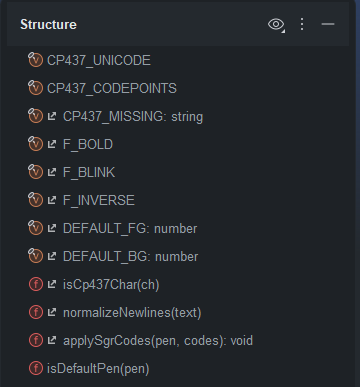
My problem is the colors of these icons below. I'm red-green color blind and can't tell the values from the functions. The v and f are there but they don't really help at a glance. I really have to look carefully to see the difference, and it would be great if they were more obviously different. Thanks for any ideas. (Resizing the entire UI, or even just this window is not a solution that is worth the cost of having less text onscreen.)
请先登录再写评论。
We have a related feature request which is not implemented yet: https://youtrack.jetbrains.com/issue/IDEA-144098
But you could create your own theme with custom icons: https://plugins.jetbrains.com/docs/intellij/themes-customize.html#customizing-icons
For example, you could use the below steps to create a theme:
1. Install IntelliJ IDEA https://www.jetbrains.com/idea/
2. Install "Plugin DevKit" plugin in IntelliJ IDEA https://plugins.jetbrains.com/plugin/22851-plugin-devkit
3. On IntelliJ's welcome screen, click `New Project | IDE Plugins | Type: Theme`.
4. In this project's `xxx.theme.json`, add some content like:
{
"name": "Demo",
"author": "YourCompany",
"dark": true,
"editorScheme": "Islands Dark",
"parentTheme": "Islands Dark",
"ui": {
},
"icons": {
"/nodes/field.svg": "/field.svg",
"/nodes/variable.svg": "/variable.svg" }
}
5. Use https://bjansen.github.io/intellij-icon-generator/ to generate any icon you prefer and put it under `resources` folder.
6. In steps 4's `"/nodes/field.svg": "/field.svg",`, the `/nodes/field.svg` refer to the icon type that you want to change, `/field.svg` means the real svg file name located in `resources` folder you want to use.
All default structure node icons can be found in https://github.com/JetBrains/intellij-community/tree/8dae702df963ac7bbba37e35bd29ad4a98bc5bdd/platform/icons/src/expui/nodes
Any svg file name prefixed with `/nodes` like `/nodes/field.svg` refer to the icon type that you want to change.
7. You could click the run button in `xxx.theme.json` file to test it directly.
8. You could use IDE main menu `Build | Prepare Plugin Module $MODULE_NAME$ for Deployment` to build the theme plugin and install it to use it: https://plugins.jetbrains.com/docs/intellij/deploying-theme.html?from=DevkitOpenThemeReference
Please check the details doc about how to create a theme: https://plugins.jetbrains.com/docs/intellij/themes-getting-started.html?from=DevkitOpenThemeReference
Thanks, this is great. I found another possible solution as well. The IDE prompted me to install Atom Icons for Material, which comes with a PSI icons pack. The icons are really good, both the colors are very CB friendly and the shapes are very clear to tell apart. I'm not sure if this pluin is just a trial and it will ask me to pay for it or not, but if I have to stop using it, at least I know how to create my own theme now.
From my checking, this is a free plugin so you can use it without paying anything.