Is there a way to unbind ↑ and ↓ from the code completion popup?

I like code autocompletion being on by default, but I don't like that it steals arrow key focus, because I VERY often navigate my code using the up and down arrow keys, and making simple changes brings up the autocompletion window every time.
I see that I can bind something else to `Select Next Completion Option`, but this does not unbind the arrow keys. I did unbind `Select Suggestion Above/Below` from the arrow keys, but it doesn't work (I assume because that's the Terminal section).
When I see what the Up key is bound to, besides the fundamental `Editor Actions - Up` binding, I see these:
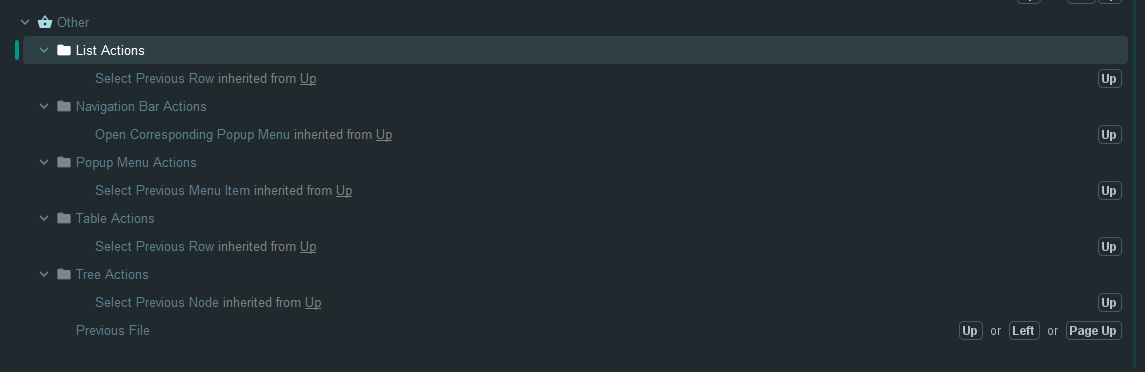
I've tried unbinding Up from `Popup Menu Actions` and `List Actions`, but that did not stop the up arrow from being taken by the code completion popup.
Am I SoL on this one? I suspect that the code completion popup is using the basic editor up action and not anything specific that can be unbound; is that correct?
请先登录再写评论。
Hello, Pipplepopple ,
We have a corresponding feature request for this:
https://youtrack.jetbrains.com/issue/IDEA-210760
https://youtrack.jetbrains.com/issue/IDEABKL-7688
Please vote for the issue to receive updates on its status. Feel free to leave specific feedback in the comment section of the issue to better explain your use case or concerns.
Alternatively, using IdeaVim plugin, you can navigate through the code completion popup with the
Ctrl-PandCtrl-Nkeys.