Hi Pavel Vykriva , sorry to tell we do not have such settings specific for the inline completion inside the commit text area.
You can disable the automatic inline completion: Settings | Editor | General | Inline Completion | disable “Enable automatic completion on typing”.
If this is disabled, you will also lose the automatic inline code completion while editing the code. And you need to use the shortcut to call the inline completion manually.
For your case, another workaround is to use ESC when the inline completion shows in the commit text area.

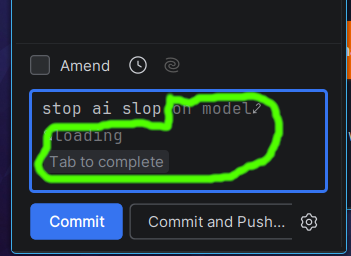
Hi Pavel Vykriva , sorry to tell we do not have such settings specific for the inline completion inside the commit text area.
You can disable the automatic inline completion: Settings | Editor | General | Inline Completion | disable “Enable automatic completion on typing”.
If this is disabled, you will also lose the automatic inline code completion while editing the code. And you need to use the shortcut to call the inline completion manually.
For your case, another workaround is to use ESC when the inline completion shows in the commit text area.