Documentation Tool window not showing the full documentation, Only shows method headers.

Good day everyone. I am having this issue that I can't seem to solve. The documentation window (and quick documentation) Only show me the method headers and annotations, not the actual javadoc stuff.
Issue:
Documentation window doesn't show javadoc stuff
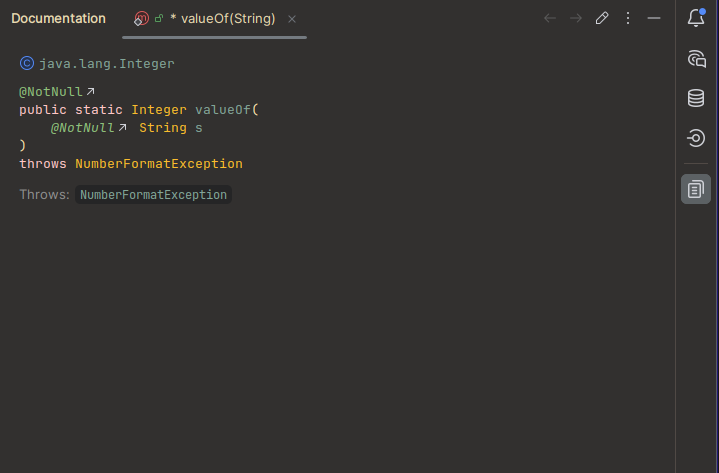
What I've tried:
in project structure under platform settings>SDKs add both my locally installed and oracle docs; tried one at a time and both at the same time.
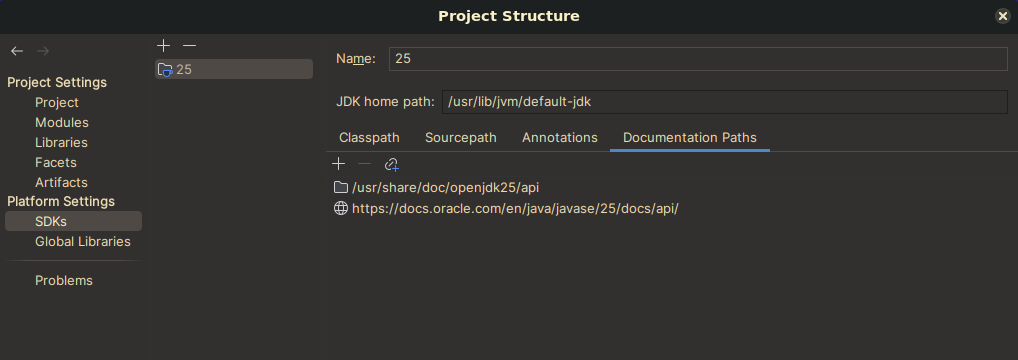
invalidate caches and restart
confirm the docs actually exists in browser.
restart my computer.
System:
(P.s. also happened on release versions, and on my cachyos install.)
IntelliJ IDEA 2026.1 EAP
Build #IU-261.22158.46, built on March 5, 2026
Source revision: 2112974315ff5
Runtime version: 25.0.2+10-b329.72 amd64137.0.17-261-b65
VM: OpenJDK 64-Bit Server VM by JetBrains s.r.o.
Toolkit: sun.awt.wl.WLToolkit
Linux 6.12.76_1
Void Linux; glibc: 2.41
GC: G1 Young Generation, G1 Concurrent GC, G1 Old Generation
Memory: 1966M
Cores: 16
Registry:
ide.experimental.ui=true
jdk from the package manager (xbps)
$ java --version
openjdk 25.0.2 2026-01-20
OpenJDK Runtime Environment (build 25.0.2+-void-r1)
OpenJDK 64-Bit Server VM (build 25.0.2+-void-r1, mixed mode, sharing)
请先登录再写评论。
Hi, thank you for reporting this. I couldn't reproduce the issue on my side. To investigate it further, could you please collect the IDE logs in Help | Collect Logs and Diagnostic Data and share them using the JetBrains Upload Service?
If possible, please also include a short screen recording or screenshots showing how the Documentation tool window only displays method headers and annotations instead of the full Javadoc content. Thanks!