How to customize the border color of the bracket scope for C++ in Rider
已回答

请先登录再写评论。
Answered on Stack Overflow - https://stackoverflow.com/a/79912917
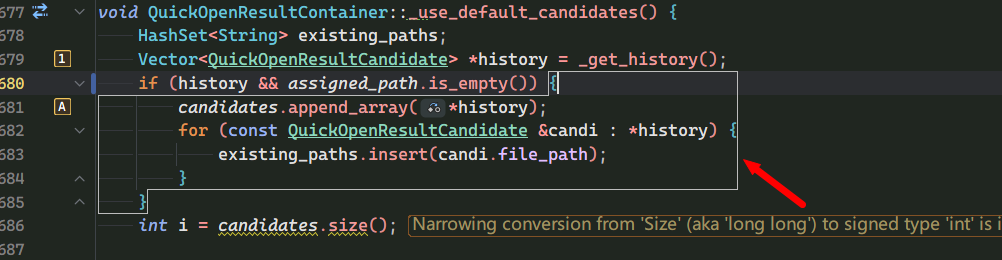
Anna Falevskaya Rider has this border natively for C++. No plug-ins are used, but the color cannot be changed.
Jasonz, please clarify what option you used to enable the border.
I don’t know, I was using C# and didn’t have this until I opened the C++ project
There is no such feature by default:
Please go to File | Settings | Plugins, use the Disable All Downloaded Plugins action, and restart Rider:
Does the border disappear after that? If so, then it's provided by a downloaded plugin (i.e., it's not a built-in feature).
I disabled all plugins and restarted and still got this.
I opened Godot instead of the console application, maybe it has something to do with this
Hello Jasonz,
What a theme and colorscheme do you use? Would you mind sharing Rider logs and IDE settings, please?
Have a nice day!
Now I see, apologies for the confusion. You seem used ReSharper earlier. This border is configured from ReSharper:(Highlight with: Outline)
Rider can use this setting when it is enabled.
The setting is written to .dotsettings file. Likelt it is in the solution-level file, or in the global dotsettings. See documentation for more details about layers.
Answering your question, changing the color of this border isn't supported.
Should you desire to disable it, find this entry in .dotsettings file and remove:
<s:String x:Key="/Default/Environment/Editor/MatchingBraceHighlighting/Style/@EntryValue">OUTLINE</s:String>Hope that helps.
Could you not paste the actual Stack Overflow question (or the text from the page)? The link alone doesn’t include the question details here, so I can’t write a relevant reply yet.
Masonreed The answer from Dmitry Kazantsev has already solved it.