Grey overlay on X-Windows Server hosted Intellij IDEA 2026.1
已回答

I've just upgraded my IntelliJ IDEA to version 2026.1 and now my windows are overlayed with some sort of grey filter.
I'm using WSL-2 and using the GUI through X-Windows.
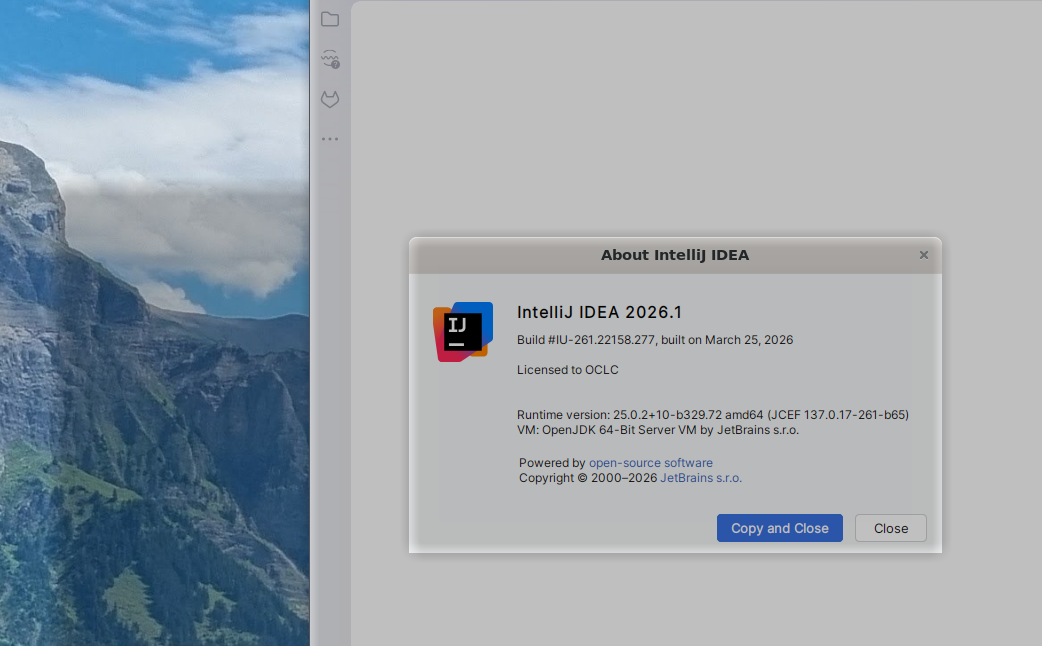
Any ideas?
I've been using IDEA this way for years and this only happened after this upgrade.
请先登录再写评论。
Hello Richardheath88
We already have an open ticket for this, you can subscribe to JBR-10006 to check the workaround and for further updates. Please also upvote it so that we can see the real number of affected users.
Thanks!
The workaround fixed it! :)
@FNAF Game
The grey filter is almost certainly a known IntelliJ IDEA 2026.1 Wayland/JetBrains Runtime rendering bug exposed by WSL2. Your previous X11 setup isn't suddenly broken; IDEA 2026.1 changed its Linux GUI behavior by enabling native Wayland, which introduced the rendering artifact.
Thanks for reaching out.
We are sorry to hear that you are facing this issue. This is a known issue, and we are working on it to fix it. You can upvote the ticket and track the progress here: https://youtrack.jetbrains.com/issue/JBR-10006
Until the runtime fix is fully rolled out, there are two workarounds that may be effective:
1. Force IDEA back to X11 (most reliable):
- Help | Edit Custom VM Options…
- Add a new line: `-Dawt.toolkit.name=XToolkit`
- Restart the IDE.
2. Stay on Wayland but disable shadows (may still have quirks):
- Keep `-Dawt.toolkit.name=WLToolkit` and add `-Dsun.awt.wl.Shadow=false` to the VM options, then restart.
Please let me know if this helps and if you have any other questions.
I apologize for the formatting issues in my previous email. Here are the corrected steps:
1. Force IDEA back to X11 (most reliable):
Help | Edit Custom VM Options…
Add a new line: `-Dawt.toolkit.name=XToolkit`
Restart the IDE.
or
2. Stay on Wayland but disable shadows (may still have quirks):
- Keep `-Dawt.toolkit.name=WLToolkit` and add `-Dsun.awt.wl.Shadow=false` to the VM options, then restart.
Please let me know if you have any questions.