Refactor > Move Class > Changes Detected

Every single time I try to move a class I get this dialogue:
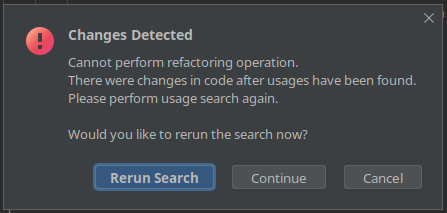
Changes Detected
Cannot perform refactoring operation.
There were changes in code after usages have been found.
Please perform usage search again.Would you like to rerun the search now?
If I rerun search, PhpStorm refreshes the Refactoring Preview and when I try to confirm I get the same dialogue. It isn't a recent issue, it's been this way for at least several months.
If I continue, the class is successfully moved.
Why could PhpStorm possibly think that I'm changing files in the background all the time?
请先登录再写评论。
Hello,
While there were similar cases before, I do not recall any new reports for the last couple of years.
I have no idea on how to reproduce it locally, sorry :(
Would it be possible to share more context or record a short screencast?
By the way, do you have quality tools configured as external formatter?
This is a company laptop, I don't know how to record screencasts, but I don't think that would show much info.
No, I don't have external formatters, just a linter.
There a couple of things I've tried that fix the issue:
So there must be a background process running or something that makes PhpStorm believe the files are being changed… 🫤
Hm.. I wonder what can change files in the background.
Does it happen with all classes or files from a specific location only? Is there any chance that projects are located on a network share of some sort?
It's in local filesystem, but the code is part of a delegated Docker volume, where it's accessed by php-fpm, could it be that?
services:
nginx_php:
volumes:
- ./symfony:/var/www/symfony:delegated
It might be; although, I was not able to quickly reproduce it in a similar way.
Is it also reproducible for classes not linked to that directory/volume?