IntelliJ's CLI doesn't run java/javac; The program does not detect the files no matter what.

My structure:
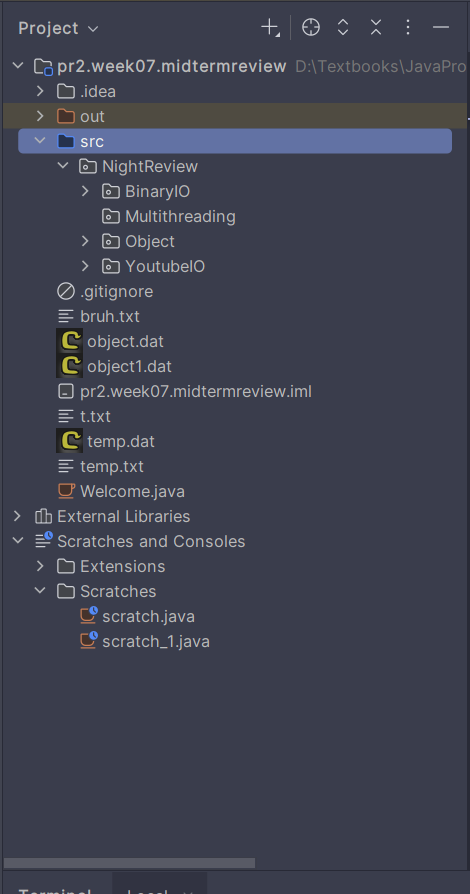
Issues:
First,
My CLI can't find the BinaryIO.java(inside the BinaryIO directory) no matter what I do; I tried to make NightReview a source directory and it turns out to be working in a weird way like this:
"java BinaryIO Welcome.java Temp.java
Error: Could not find or load main class BinaryIO
Caused by: java.lang.NoClassDefFoundError: BinaryIO (wrong name: NightReview/BinaryIO/BinaryIO)"
Moreover, IntelliJ was able to detect my files(object.dat, temp.dat,…) until the “fix” makes it confused.
I've also tried to resolve the problem by configure the environmental variables, let's just say it simply doesn't do anything.
This is my code: package NightReview.BinaryIO;
import java.io.*;
public class BinaryIO {
public static void main(String[] args) throws IOException{
if (args.length != 2) {
System.out.println("Usage: java BinaryIO sourcefile targetfile");
System.exit(1);
}
//Check if the source file is actually exist
File sourceFile = new File(args[0]); //Only throw null pointer exception
if(!sourceFile.exists()) {
System.out.println("Source file " + args[0] + " does not exist");
}
//Check if target file already exists or not
File targetFile = new File(args[1]);
if(targetFile.exists()) {
System.out.println("Target file " + args[1] + " already exists");
}
try(
BufferedInputStream input = new BufferedInputStream(new FileInputStream(sourceFile));
BufferedOutputStream output = new BufferedOutputStream(new FileOutputStream(targetFile));) {
int value, copiedByteCount = 0;
while((value = input.read()) != -1) {
output.write((byte)value);
copiedByteCount ++;
}
System.out.println(copiedByteCount + " bytes copied");
}
}
}
Second, I simply can't refactor anything
When I click on “Refactor”, it just, does ABSOLUTELY nothing, no window closing, no messages, just… nothing
My Questions:
How do I resolve this? By that, I mean just run java BinaryIO Welcome.java Temp.java normally(I've already ran javac)
What exactly is the source directory in IntelliJ? How does it work? Why can't it be simpler?
请先登录再写评论。
Your file says `package NightReview.BinaryIO;` at the top, so the compiled class file remembers its full name as `NightReview.BinaryIO.BinaryIO`. When you call `java BinaryIO`, the JVM finds the class but notices the name doesn't match the one baked into the bytecode. That's what `wrong name: NightReview/BinaryIO/BinaryIO` is telling you.
From the command line you need to be in the directory that contains the `NightReview` folder, not inside it but one level above, then run:
```
java NightReview.BinaryIO.BinaryIO Welcome.java Temp.java
```
The full class name with the package prefix is what matches the bytecode.
The simpler option is to hit the green arrow in IntelliJ's gutter (next to `public static void main`). That sets up the classpath for you so you don't have to think about any of this.
On source roots: think of them as the "I'm starting to count packages from here" marker. If `src/` is the source root and your file lives at `src/NightReview/BinaryIO/BinaryIO.java`, IntelliJ reads the package as `NightReview.BinaryIO`. If you marked `NightReview/` itself as a source root, IntelliJ would then expect the package to be just `BinaryIO`, which won't match what the file declares. That's probably the "fix" that confused things.
For the Refactor problem: which one were you trying? Rename, Move, Extract Method, something else? And how did you trigger it (right-click in the editor, the Refactor menu, keyboard shortcut)? "Nothing happens" can have a few different causes, and which fix applies depends on which refactoring.