idea 2026.1 junit test run error
已回答

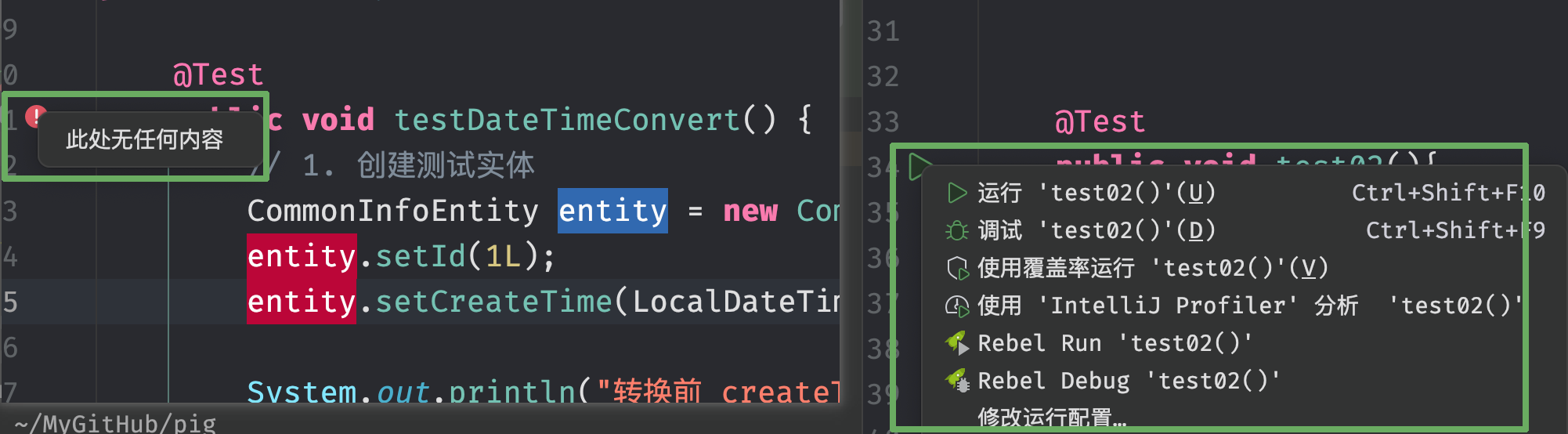
Is anyone else experiencing this? When working on a Spring project, I find that clicking the "Run" button on the right-hand side of a test class results in a blank popup, preventing me from executing JUnit tests. However, the exact same code runs successfully if I open the directory directly in IntelliJ IDEA as a standalone project.
请先登录再写评论。
fix this. it is import android module ,gradle change global,disable Test Junit ,del ./idea/runConfigurations.xml ,but it show again,when restart idea.The bundled Android plugin is the cause. When it starts up in a project with no Android modules, it adds the JUnit run configuration producers to the `ignoredProducers` set in `.idea/runConfigurations.xml`, which leaves the gutter Run popup empty. IntelliJ IDEA narrowed this in 2024.3 so the behavior only applies to Android Studio or projects that have Android modules, but the plugin code can still trigger it for non-Android projects on cache invalidation or restart. It's tracked as [IJPL-199997](https://youtrack.jetbrains.com/issue/IJPL-199997).
Workaround:
1) Close IntelliJ IDEA.
2) Delete `.idea/runConfigurations.xml` from your project root.
3) Open **Settings | Plugins**, find **Android** in the plugin list, and uncheck it. You are working on a Spring project, so you should not need the Android plugin.
4) Restart the IDE.
Step 2 alone restores the Run gutter right away, but the entries get re-added on the next startup or after Invalidate Caches if the Android plugin stays enabled. Step 3 prevents that.
If you want to follow IJPL-199997 for fix updates, see [How to follow YouTrack issues and receive notifications](https://youtrack.jetbrains.com/articles/SUPPORT-A-1737).