idea2026.1.2 maven使用异常
已回答

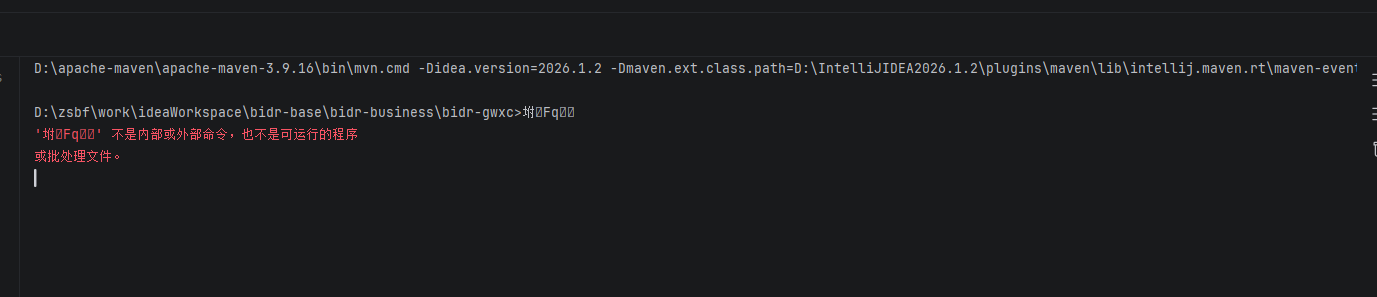
D:\apache-maven\apache-maven-3.9.16\bin\mvn.cmd -Didea.version=2026.1.2 -Dmaven.ext.class.path=D:\IntelliJIDEA2026.1.2\plugins\maven\lib\intellij.maven.rt\maven-event-listener.jar -Djansi.passthrough=true -Dstyle.color=always -Dmaven.repo.local=D:\zsbf\work\maven\repository clean -f pom.xml
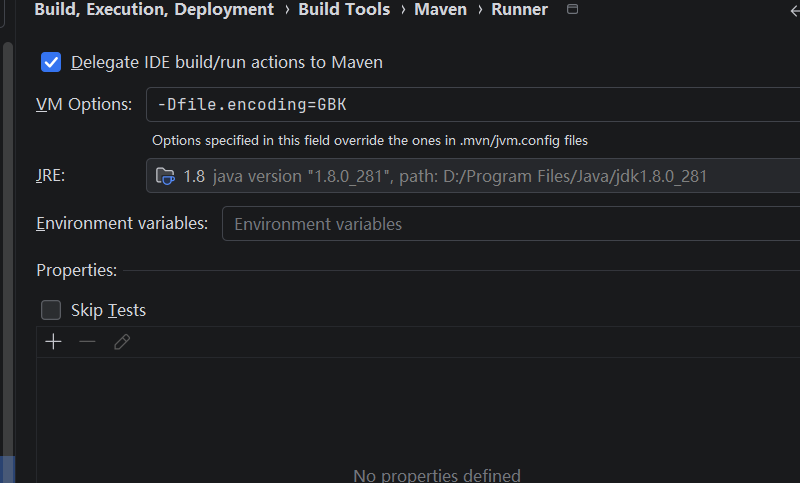
maven install或clean都有问题,目前只配置了GBK变量,不配置会乱码
请先登录再写评论。
Hi 1194771957,
1. Please try running similar Maven commands from your OS terminal and compare the results with what you get in IntelliJ IDEA. Do the Maven goals for your project run correctly? This will help check whether the IDE affects this issue or whether the problem exists outside it.
2. Could you please clarify exactly which command you are trying to run from the console — the second command in your first screenshot, before the red error message?
3. It would be very helpful if you could provide a minimal sample project with a similar scenario and issue so that we can reproduce it.
4. Please try running the same Maven commands you are attempting to execute, but add the
-Xoption so that we can examine the issue details more thoroughly.All files with results you can upload securely to our server https://uploads.jetbrains.com/ and provide us with the Upload ID. The uploaded data will be accessible only to our team and will be used solely for investigating this issue.
Thank you!
hi:
1.
使用maven插件,只点击了一次install命令,下面这个是自动弹出的,有时候会乱码。我在powershell中执行命令是可以成功的。
2.没有特定场景,目前我所有项目都是这个问题。但是在cmd命令黑窗口中直接mvn install 也是成功的。
在Terminal中,项目目录下直接mvn install是成功的
Thanks,
Could you please collect IDE logs using Help | Collect Logs and Diagnostic Data, upload them securely to our server https://uploads.jetbrains.com/ and provide us with the Upload ID?
Could you also please try to perform the following steps:
1. Open the IDE registry as described in this article: https://youtrack.jetbrains.com/articles/SUPPORT-A-1030
2. Look for the
maven.use.scriptskey and disable it3. Restart the IDE and check again
4. Let us know if that helped.
感谢您的回复与支持,问题已解决!
I'm glad to hear that the workaround is helped you.
It will be great if you can share additional data about this issue, so we can create a proper bug report in our issue tracker and investigate it further.
Could you please provide us the following information:
1. A sample minimal project which reproduces your problem;
2. Add to your project's pom.xml file the following build settings:
Then run
mvn clean install -Xvia IntelliJ IDEA and provide the output of this command.3. IDE logs collected via Help | Collect Logs and Diagnostic Data;
4. Upload all data securely to our server https://uploads.jetbrains.com/ and provide us with the Upload ID
Thank you in advance!
sorry,电脑安装了加密工具,无法提供出来idea的日志信息。
If it is possible for you to provide other data described in my previous message (excluding your IDE logs), it would be useful for us to investigate it deeper.
Thanks!