Switch run configurations when executing unit tests in different folders

Hello together,
I have several components with test directories in one folder:
/root
- component1/tests
- component2/tests
- ....
For each of these components I have one mocha run configuration because they differ in some way (e.g. other execution parameters,...).
When I now use the "run single unit test" icon in the editor:
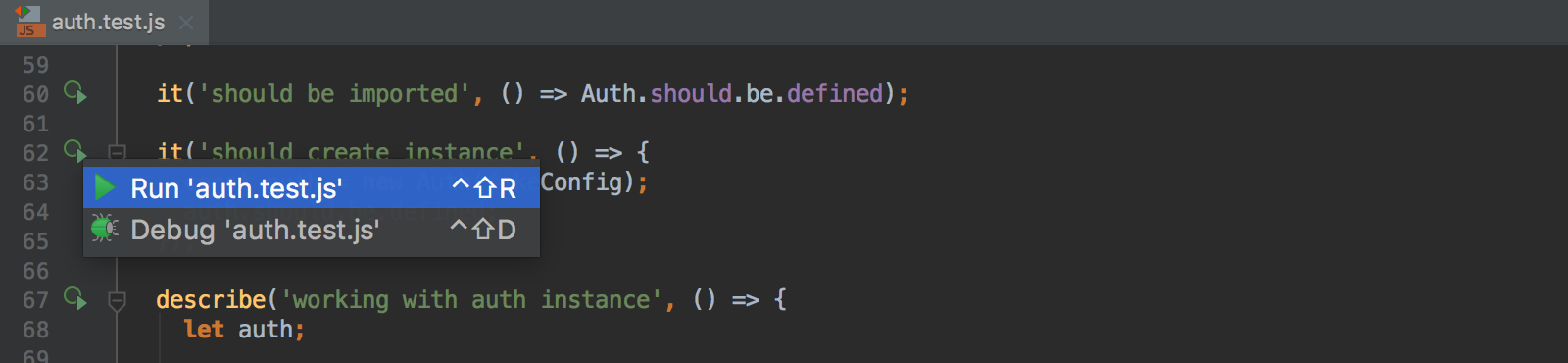
I am not asked which run configuration should be used. Webstorm always uses the default mocha run configuration.
Is there a way to specify which configuration should be used in which directory?
I have configured the test directory in my run configurations but it seems Webstorm ignores this field in that case.
Thank you and with best regards,
Stefan
请先登录再写评论。
not sure I follow you... Do you mean that WebStorm should use parameters defined in your existing run configurations when creating new configurations, instead of using the default run configuration? No, there is no way to tell WebStorm what existing configuration to use as a template, the default run configuration will always be used
Hello Elena,
exactly - when I run a single unit test by using the run icon next to the unit test method (see picture in my first post) then WebStorm uses the default mocha run configuration for the execution of that test.
As explained above we have several components in our project folder. Each of that components has its own unit tests. Since the mocha configuration differs between the components I have to create one configuration per component. Because of that I cannot use the really great feature to run a single unit test with one single click because WebStorm is always using the default mocha run configuration.
Currently I have to copy all parameters of a configuration to the default configuration to be able using that feature. This is very cumbersome because the run configurations are quite complex (environment variables,....). The only alternative I have is to mark the test as "only" and run the specific run configuration myself.
It would be great if I can choose a run configuration when no default run configuration exists. Currently the "Edit configuration" dialog is shown when you have no default configuration and try to run a single unit test. There I have to set everything for a new configuration. That does not make sense for me because I already have a working configuration.
It would be even better if WebStorm can do that on its own. You could use the "Test directory" property of a run configuration.
Example:
I hope you now can get what I try to explain.
Thank you.
Please feel free to file a request for this feature to youtrack, https://youtrack.jetbrains.com/issues/WEB
Thank you. Here is my request: https://youtrack.jetbrains.com/issue/WEB-30900
I had a similar need and solved it by having `test/mocha.opts` files, like this:
In my case, that `./src/index.js` is setting up some global variables to match
the environment we have in the browser, but in Stefan's case, it can setup
`process.env.VAR`
Thanks Tamas! `mocha.opts` could help here indeed.