Invalid encoding in the npm tool window
已回答

Why do I sometimes see something like this (pic below)? I saw this in different versions of PhpStorm and WebStorm.
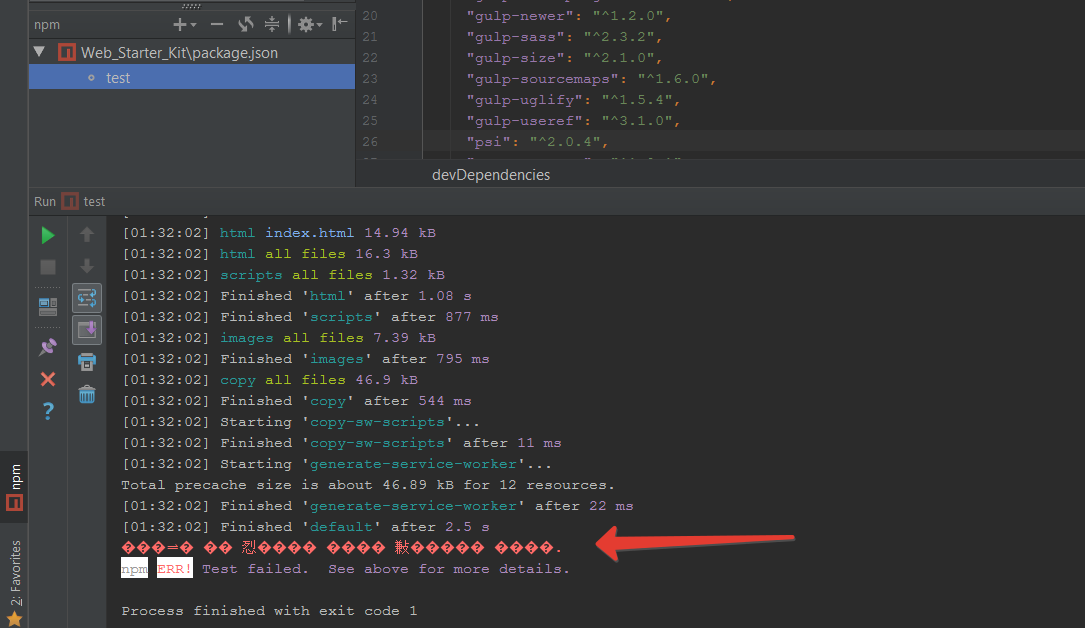
At the same time I see in the next window this:
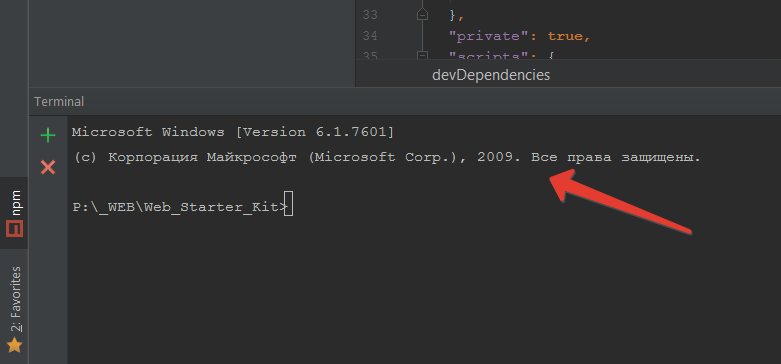
Judging by this, there is no global problem with the Cyrillic alphabet, right? It seems to me that I tried to change all the settings relating to the encodings, but this did not help. My OS is Windows 7. This problem occurs when using npm (Gulp, clear npm).
请先登录再写评论。
I suggest reporting an issue at https://youtrack.jetbrains.com/issues/IDEA with the exact steps to reproduce.
Notice that Terminal encoding can be different (on Windows cmd.exe shell encoding can be 866, verify with chcp). The encoding in the Run console which is not a Terminal can be different. Normally it should be the same as IDE or project encoding. See http://blogs.jetbrains.com/idea/2013/03/use-the-utf-8-luke-file-encodings-in-intellij-idea/.
>Notice that Terminal encoding can be different (on Windows cmd.exe shell encoding can be 866, verify with chcp).
You are right, I checked encoding in terminal and it is 866.
>Normally it should be the same as IDE or project encoding. See http://blogs.jetbrains.com/idea/2013/03/use-the-utf-8-luke-file-encodings-in-intellij-idea/.
As I said before, I tried these settings. In my opinion, I tried all the settings at all :-)
>I suggest reporting an issue at https://youtrack.jetbrains.com/issues/IDEA with the exact steps to reproduce.
np
Windows 10 x64 Russian
I've the same problem in Webstorm 2018.2.6 in my office. At home I haven't this problem. It is very sad problem because I can't read the npm console output. When you will fix this problem? Is exist any workaround?
Thank you.
Please comment/follow https://youtrack.jetbrains.com/issue/WEB-31247.