Generate HTML Form Auto-completion From Dot Notation (what keys to press?)

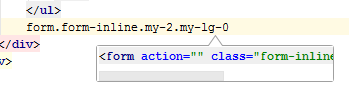
This should be a quick question. I have no idea what this feature below is called. I'm following an online course, noticed the presenter do this, tried it in PyCharm, seems to do something because the form I want to create appears in a window below. My question is, what sequence of buttons do I have to press to execute to create this actual HTML code block seen in the window below?
请先登录再写评论。
It's called zen coding.
It's Emmet abbreviation (https://docs.emmet.io/abbreviations/).
Normally you need hitting Tab to expand it, unless you have assigned a different key to Expand abbreviation with in Settings | Editor | Emmet
See https://www.jetbrains.com/help/pycharm/2018.1/using-zen-coding-support.html for more info