IntelliJ Project Tool Window Shows Different Folders Than Before

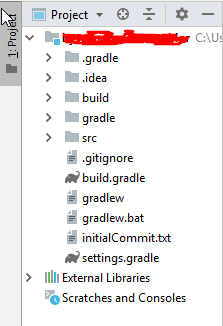
Say my current project is called project_x. Normally, in the Project ToolWindow the outermost directory displayed would be the directory project_x, alongside things such as External Libraries. Kind of the default, as one would expect.
However, IntelliJ displayed a message that I cannot exactly remember, but which said something like "an external change has occured". It then asked me whether I would like to rebuild the current project, and I did.
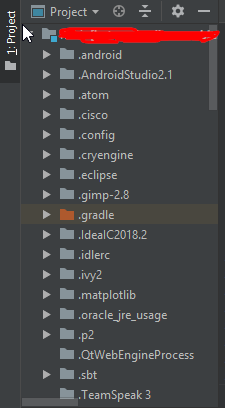
Problem: now, the outermost directory displayed is my User folder, i.e.: Username [project_x] -> IdeaProjects -> project_x
I find this annoying (especially since IntelliJ now tries to index every folder in my user-dir, which takes forever...), and would like to know how to revert back to the default settings. Help would be appreciated.
Edit: First screenshot is how it looks like, the second is how it SHOULD look like
请先登录再写评论。
It has happened again in another project... this is so annoying...
I've posted the same question on SO. If you follow this link there will also be a screenshot:
https://stackoverflow.com/questions/53161481/intellij-project-tool-window-shows-different-folders-than-before
Edit: I've provided the screens now
Any help would be appreciated
Resolved by user: https://stackoverflow.com/a/53343414/104891.