Tool window Plugin - Responsive GUI
已回答

Hi,
I'm creating a plugin which would have a settings window. The overall structure of the window should be something like this:
I was able to create the functionality, but I haven't been able to make the window responsive (auto-adjust the panel's width). Moreover, I haven't been able to make the inside panels fill the entire width of the main panel, they always end up being centered like this:
I tried using both Border layout and Gridbag layout. Here is a simple example of both code and display that illustrates the issue.
Code:
```
public class MessagePanel extends JPanel {
    private JPanel panel = new JPanel();
    private JTextArea messageLabel;

    public MessagePanel(String message) {
        panel.setLayout(new GridBagLayout());
        GridBagConstraints gbc = new GridBagConstraints();
        gbc.weightx = 1;
        gbc.weighty = 1;
        gbc.fill = GridBagConstraints.BOTH;

        panel.setBorder(BorderFactory.createLineBorder(Color.BLACK));
        messageLabel = new JTextArea(message);
        messageLabel.setEditable(false);
        messageLabel.setLineWrap(true);
        messageLabel.setWrapStyleWord(true);

        panel.add(messageLabel, gbc);
        this.add(panel, gbc);
    }
}
JPanel table = new MessagePanel("Test example to show that the panel does not fill itself Test example to show that the panel does not fill itself");
ContentFactory contentFactory = ContentFactory.SERVICE.getInstance();
content = contentFactory.createContent(table, "", false);
toolWindow.getContentManager().addContent(content);
```
Screenshot: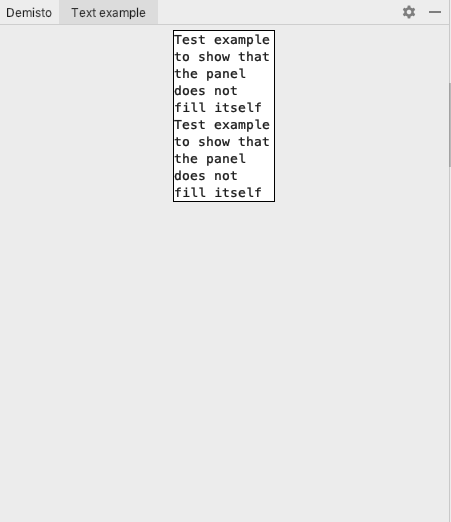
I would highly appreciate advice about how can I make the panels fully fill their width.
Thank you,
Shachar
请先登录再写评论。
Solved by a combination of GridBaglayout and GridLayoutManager.
UI Designer may also help with such tasks.