Select methods to implement _always_ puts annotations on the same line

Hi,
This has been frustrating our team for quite a few months (I forget when it started happening). As far as we've been able to determine we have changed nothing with in our code format settings.
Consider this example:
public class Clip {
    public static void main(String[] args) {

        Operation o = new Operation() {
            //<press ctrl + i here to implement method>
        };

    }

    interface Operation {
        @Nullable
        String doSomething();
    }
}
When letting intellij implement the method we get this. The @Nullable annotation appears on the same line where it used to appear on the line above which is what we are expecting. Curiously the @Override does appear in the correct place. Is there some special handling for the intellij @Nullable/@NotNull annotations?
Operation o = new Operation() {
    @Override
    public @Nullable String doSomething() {
        return null;
    }
};
Here are the relevant code style settings I have tried. The one called "Method Annotations" is set to "Wrap Always". It's this that seems to not be working.
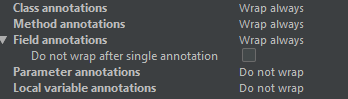
Intellij: 2018.3.2
It would be really great to resolve this. Is there something obvious I'm missing?
Cheers
Oliver
PS: There seem to be a number of issues relating to this but none of them seem to provide a solution:
https://intellij-support.jetbrains.com/hc/en-us/community/posts/206627789-Java-code-formatter-Annotations-on-a-single-line
https://stackoverflow.com/questions/15284911/intellij-code-formatting-java-annotations-on-new-lines
https://stackoverflow.com/questions/46048052/how-to-format-annotations-in-one-line-in-intellij-idea
请先登录再写评论。
Please see the feature request at YouTrack:
https://youtrack.jetbrains.com/issue/IDEA-168035
and its duplicate: https://youtrack.jetbrains.com/issue/IDEA-163132
already created for the related issue. Please follow it for more information. Thanks!
Thanks Olga!