I want to change method completion completion
已回答

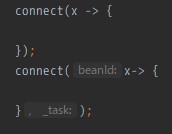
There are two overloading methods as follows.
I mistakenly chose the method below, but I would like to change it to completion above.
However, it was not possible to change the hint display of the parameter anyway.
Do I have to redo the method input from the beginning?
请先登录再写评论。
>I mistakenly chose the method below,
>However, it was not possible to change the hint display of the parameter anyway.
Can you attach screenshot describing what you have entered and the result you see? Is it Java?
Yes, it is Java 8.
I am using IntelliJ IDEA 2018.3.3 (Ultimate Edition).
I added a screenshot with a comment below.
Here you may change the method signature by pressing Cmd+P and switch with Alt+up/down arrow. Now the data already entered will be lost, but there is the issue already created for it, please follow/comment: https://youtrack.jetbrains.com/issue/IDEA-198899
Thank you. On Windows it was possible to switch by Ctrl + P followed by Ctrl + Up / Down. I wrote a comment on the issue ticket.
Could we just get an option to disable that feature completely. It drives me crazy that I have to select the correct method manually!
Often times I know the method name and just try to avoid unnecessary key presses.
Please allow me to change the behavior.
Maybe try to get best of both worlds? Maybe prefer completions for the selected method.
But please allow me to complete the parameters.
Hello Johannes,
In case IDEA suggests you different method signatures in popup when you start typing method's parameters, you can select the variant manually with Alt+arrow or just ignore the hint and continue typing. If you find such a hint irritating, you may disable Show parameter name hints on completion and Show the parameter info popup options in Preferences | Editor | General | Code Completion.