Version Control tab - how to exclude several branches with custom filter? Regexp is broken

Hi,
In Version Control tab there is Branch filter (Branch > Select...)
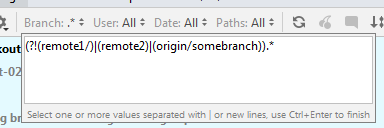
I want to create filter which excludes some branches from my main remote and all other remotes. To do this I try to use regep with negative look-ahead like
(?!(remote1/)|(remote2)|(origin/somebranch)).*
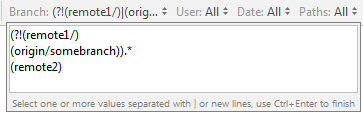
but it does not work. When I reopen input window I see that IDEA splitted my input by pipe "|" into several lines which actually broke regexp. Also it mix lines order (see sreenshot below)
When I try to exclude just one remote
(?!remote1/).*
it works perfectly. I.e. idea support both regexp in this window as same as regexp support negative look-ahead.
At the bottom there is a message "Select one or more values separated with | or new lines". So it seems IDEA force splitting by pipe.
Question: Do we have option to disable such split or any other way to exclude list of branches?
Note: option 'include only braches which you want to see' is not acceptable for me
screenshots:
Initial regexp:
Regexp after I reopened window:
请先登录再写评论。
Branch filter supports exclusions of patterns with the minus sign - see https://youtrack.jetbrains.net/issue/IDEA-135585#focus=streamItem-27-3488791.0-0
So, a 3-line filter like this should work for you:
Excellent ))
Thanks for answer.
Can this be added to official help documentation? or to bottom text of the filter dialog (change text "Select one or more values...")
We'll update the docs, thanks.