Keeping a string on the same line as @lang annotation with Reformat Code.

Hi,
I want to use the @lang annotation as demonstrated in this paragraph:
https://www.jetbrains.com/help/phpstorm/using-language-injections.html#use-lang-annotation
But when I "Reformat code" (Ctrl+Alt+L), the opening string quote jumps to the next line.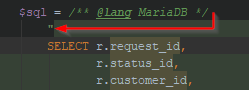
I want to keep this opening quote on the same line as the @lang annotation. I have searched and trial-and-errored my way through the PHP Code Style settings but can't find the matching setting.
Any help is appreciated,
Koen
请先登录再写评论。
Hi there,
Why not use HEREDOC instead (if that's your code, of course)?
The above will inject current SQL dialect.
You can create special Language Injection (if you have more than 1 SQL dialect in a project) for a specific LABEL to always inject MariaDB in such strings, e.g.
Just look at existing injection rule for SQL and make similar for MariaDB
Here is one for MySQL:
>This old forum topic seems to reference such a setting but I think the information is outdated. https://intellij-support.jetbrains.com/hc/en-us/community/posts/206947645-Annotations-on-the-same-line
Code style is language specific. That thread is for Java as it uses Java-specific elements (that are simply not available in PHP land).
Hi Andriy, thanks for your suggestion, which is a valid one, but which I had already considered. What I don't like about HEREDOC is the closing tag position on the start of the line, breaking up the nice indentation of the script. Which annoys me if it's a regular occurence, like SQL queries often are in Models. Am I alone in this?
Thanks for pointing out I was reading a Java thread, I deleted that from my original post now to spare people that distraction.
PHP 7.3 to the rescue :) For example: https://www.cloudways.com/blog/whats-new-in-php-7-3/#flexible ?
Other than that: I could not find any existing tickets (maybe was looking at the wrong ones .. but I do remember seeing something similar last year or so) -- check yourself and feel free to create new one: https://youtrack.jetbrains.com/issues/WI?q=comment%20%23%7BPHP%20Formatter%7D