Cannot find custom added data source

Hi experts,
I'm probably using not Datagrip as it is intended, but here is something that is weird.
I created a data source (with custom driver), wrote a few queries, then I found out that it's difficult to switch folders, so I closed Datagrip and reopened it. Now everything is gone and I can't see my data source. Does anyone know how to get it back? It took me a lot of time to set it up because of authentication issues.
A side question:
Is there a way to use real folders in Datagrip? It seems to be project oriented, which is very annoying, as I only write a small query for one project, and then I need to switch folders and projects. I still don't know how to see a folder tree and use the same data source for all of them.
Thanks in advance!
请先登录再写评论。
Nevermind, I figured it would be faster to just add the data source a second time. I'll see how can I keep the data source across folders/projects.
>I created a data source (with custom driver), wrote a few queries, then I found out that it's difficult to switch folders, so I closed Datagrip and reopened it. Now everything is gone and I can't see my data source. Does anyone know how to get it back? It took me a lot of time to set it up because of authentication issues.
>Is there a way to use real folders in Datagrip?
What do you mean by "switch folders"?
You can attach folders to your DataGrip project:
> Now everything is gone and I can't see my data source.
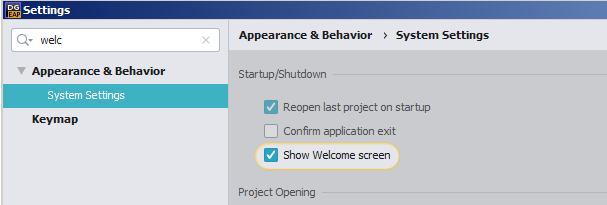
Do you open the same project? Enable `Welcome screen` and try to reopen your previous project: