How to Debug Javascipt in Pycharm Professional 2019.2

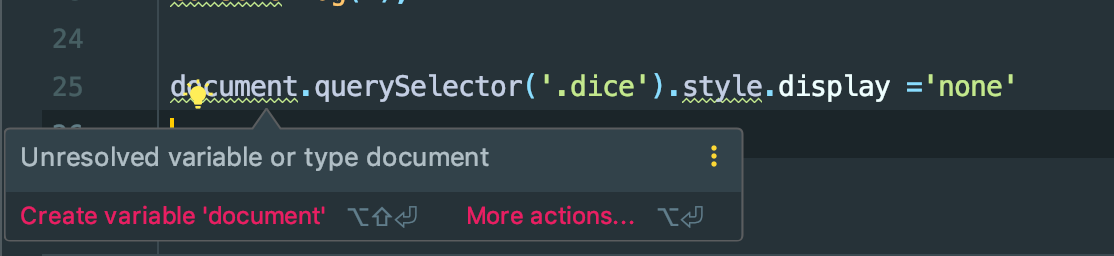
1) How do I get Pycharm to recognize common javascript object and methods like document, style, querySelector, and etc?
2) Is it possible to get a method description dropdown (right-click?) for javscript methods?
3) How do I get a javascript file (on save) to trigger/refresh the html page–– running under debug with Live Edit?
I'm still learning my way around Pycharm...really pleased with coding python in it...
Thanks :)
请先登录再写评论。
1. it should just work. If the issue persists after caches invalidation (File | Invalidate caches, Invalidate and restart), please attach screenshots of Settings | Languages & Frameworks | JavaScript | Libraries and Settings | Editor | File Types, TypeScript pages
2. Ctrl+Q (or whatever shortcut is assigned to View | Quick Documentation) should do the thing
3. would you expect the page to be refreshed once you edit a .js file? This won't work with Live edit: when using it, changes in 'external' (linked) JavaScript code don't cause immediate page reloading, they are hotswapped: new code is loaded to the browser instantly, but the results of the change will be visible only when you do something to trigger this new code. For example if you change the
onClickhandler and write new text inalert(), you will see the new text after the click without reloading the page. Same for functions triggered by timer, for example. But if the JS code is executed only on page load (and not on certain event), you have to manually reload the page to see the results - Live Edit doesn't force new code execution, it changes the code and not application state...Thanks for the reply.
1) Post executing 'Invalidate caches, Invalidate and restart'
Pycharm is (still) not recognizing javascript objects/methds like document or querySelector in the app.js file
here are the screenshots
Also, I'm no javascript expert--could be something dumb on my part.
Please re-assign
*.tspattern to Typescript file type in Settings | Editor | File Types - you must have it assigned to TypoScript...PyCharm uses
d.tsfiles (TypeScript declaration files) for standard Web/Node.js APIs resolving. As you have*.tsre-assigned to TypoScript, these files can't be correctly parsed, and library methods are not resolved.If re-assigning the
*.tspattern back to Typescript is not an option for you, try adding*.d.tsto the registered patterns for TypeScript file type in Settings | Editor | File Types. That should solve the problem, I believe.that did the trick. Definitions work now too. Thank you :) perhaps, typescript and *.ts should be default?
They ARE default; patterns are likely re-mapped by some plugin - TYPO3 CMS Plugin or TypoScript - Enterprise or whatever you are using
Hmmm. To my knowledge, I've never used TYPO3 or any TypoScript variant. Frankly, I have no idea what TypoScript is. In my (possibly unique) user experience, javascript was not quite working––as the default-out-of-box setting––for a paid product. And, this fix is not something I would have chosen on the first guess...or (perhaps) the 33rd. Regardless, thanks for helping me fix it :)