Debugging on Local Server (bitnami)

<rant>I love JetBrains' Resharper products for the dotNet universe. I would love to feel the same way about JetBrains IDEs, because they appear to be very powerful, but the documentation is terrible. It gives you all sorts of detail on what you need to do but not from anything like a workflow perspective.</rant>
Here's my current example involving PhpStorm. I am trying to develop a custom action for Elementor Pro. I am developing this on a Windows 10 desktop using the Bitnami package to run a WordPress site.
I have a PhpStorm project that contains two files: ElementorLoginAction.php and child-theme/functions.php. My first stage goal would seem to be very simple: arrange things so that both files are automatically deployed to the local server every time I explicitly save them, and then set breakpoints inside functions.php so I can see what's happening.
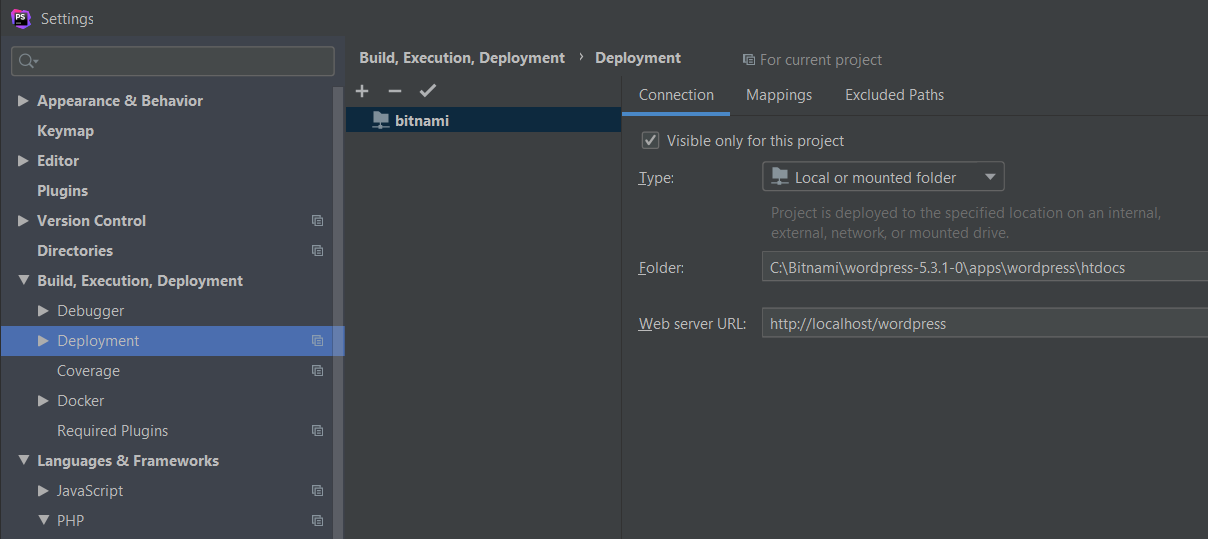
Only it doesn't work despite following the documentation as best I can. I've set up the deployment like this:
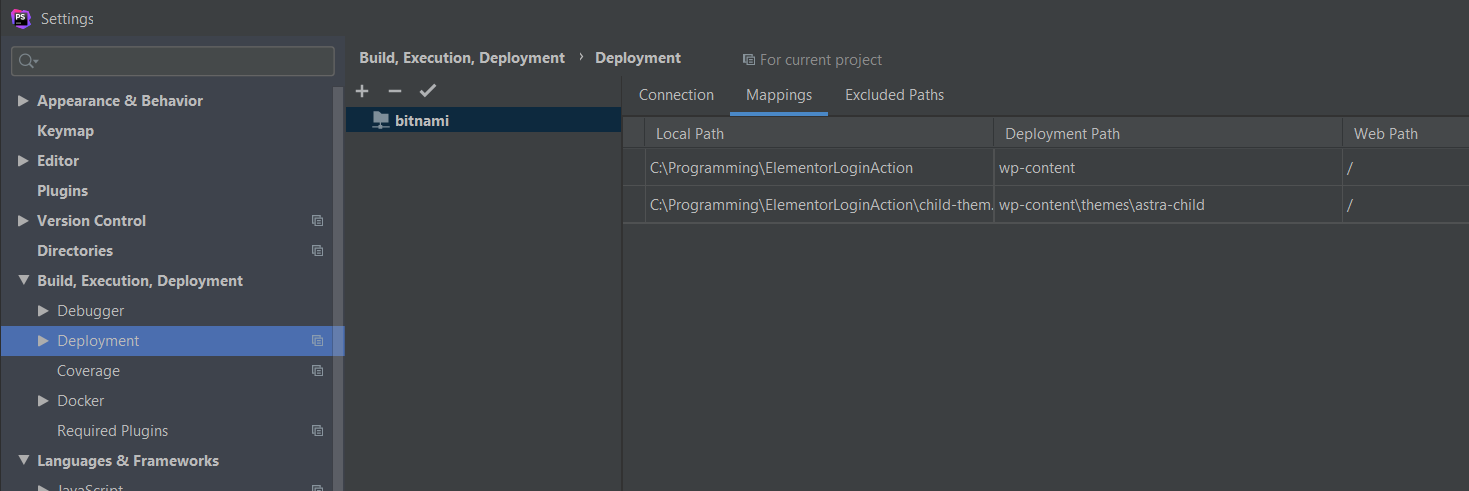
with mappings like this:
and I've set the autodeployment like this:

Yet files are >>not<< being automatically deployed when I save them. I have to do it manually.
After doing a manual deploy the next frustration is that setting breakpoints in the project-based functions.php file are not hit when I do a refresh on a Chrome window (with the debugging addon installed and operating). But they should be, as that functions.php file is in the active child theme.
I can get the breakpoints hit by setting them in the copy of functions.php in the Bitnami server's file space...but that's ridiculous. What's the point of editing a project-based file and then having to (manually) deploy that file to the local server after which I have to open the server-based file up separately in PhpStorm to set breakpoints?
So I'm either missing something or PhpStorm's debugging capabilities are like something out of and early 2000s IDE.
- Mark
p.s. If anyone has links to a site or sites which provides actual workflow-type documentation on PhpStorm I'd love to see them. Frankly, however powerful this IDE is it's essentially powerless if the capabilities aren't documented in an manner accessible to developers who don't already "know" the product.
请先登录再写评论。
Quote:
Yet files are >>not<< being automatically deployed when I save them. I have to do it manually.
Sorry for a possibly stupid question but could you please confirm that you have tried to save these files after making any changes? In fact, the file will not be uploaded on "Ctrl+S" action if no changes were applied to it.
Speaking about the hitting breakpoint, did you set any mappings in "File | Settings | Languages & Frameworks | PHP | Servers"?
As for the PhpStorm debugging documentation, there is a specific part about it in the official guide. I believe you have already seen it, but just in case:
https://www.jetbrains.com/help/phpstorm/debugging-with-phpstorm-ultimate-guide.html