Trouble getting Pycharm Professional 2019.3 to display jupyter notebook files

I'm using Pycharm Professional 2019.3 and would like to run jupyter notebooks on it locally. I've see screenshots and videos of others doing this. I've installed jupyter and ipython on pycharm and I think i'm using Python 3.7.3. However, those two packages seem to be installed on a path that says python 2.7. I'm not sure if that is the issue.
The main problem is that when I create a new .ipynb file or open an existing one, the editor doesn't display the notebook, instead it displays what looks like behind-the-scenes code for a notebook. The file icon looks like the JSON icon but the extention is .ipynb. Below is the code displayed for a newly create blank jupyter notebook.
Can anyone help me get jupyter notebooks up and running locally?
Thanks
{
  "cells": [
    {
      "cell_type": "code",
      "execution_count": null,
      "metadata": {
        "collapsed": true
      },
      "outputs": [],
      "source": [
        "\n"
      ]
    }
  ],
  "metadata": {
    "kernelspec": {
      "display_name": "Python 3",
      "language": "python",
      "name": "python3",

    },
    "language_info": {
      "codemirror_mode": {
        "name": "ipython",
        "version": 2
      },
      "file_extension": ".py",
      "mimetype": "text/x-python",
      "name": "python",
      "nbconvert_exporter": "python",
      "pygments_lexer": "ipython2",
      "version": "2.7.6"
    }
  },
  "nbformat": 4,
  "nbformat_minor": 0
}
请先登录再写评论。
Hello,
I was having a similar issue today, after I had just upgraded to the Professional edition.
After struggling for several hours, I decided to reinstall everything (Python + PyCharm). That was painful, but it fixed it. Not sure what was the problem...
Best.
unfortunately, I have the same problem...
please any help fo this?
Samih1079
Do you use PyCharm Professional?
Go to Preferences | Editor | File Types and make sure that *.ipynb is associated with the Jupyter Notebook file type.
Same on 2020.2
Hello Ibelkov ,
I am wondering if you tried https://intellij-support.jetbrains.com/hc/en-us/community/posts/360006896759/comments/360001596220. ?
Please attach a couple of screenshots of the Editor view. Thank you!
Hi, yes, I checked it.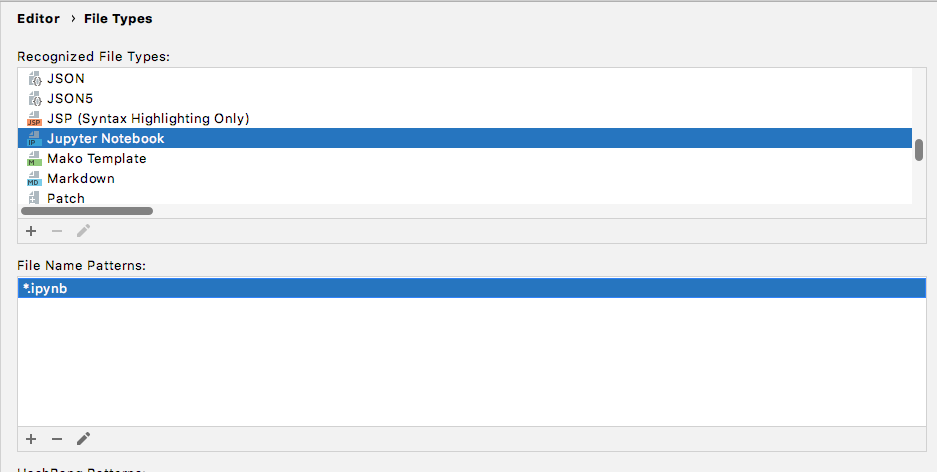
Please attach a screenshot of what you see in the editor trying to open .ipynb file.
Do you have Jupyter packages installed?
Thank you!
Hi, it kinda resolved by itself. Not sure which actions do the job. I tried to installing and removing jupyter, restarting IDE, nothing helped. So I forgot about it and just worked as usual for a couple of days, and it is working now. Thanks for the help.