Adding Python 3.8 as system interpreter but PyCharm calling it 3.7

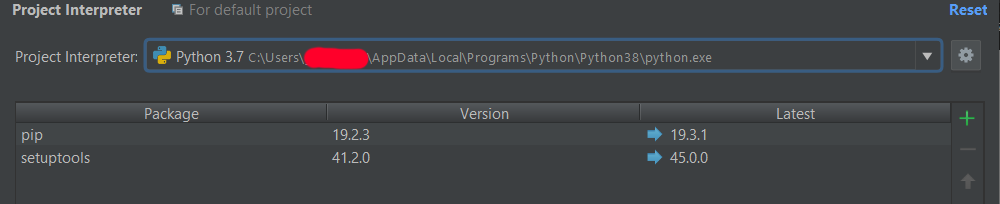
Up until today I have only had Python 3.6.5 on my machine. Today I installed Python 3.8.1 and wanted to add it as a system interpreter to PyCharm. I went to Settings > Project Interpreter > Add... > System Interpreter and saw the Python38 path in the Interpreter dropdown and clicked OK to add it. It seemed to add okay, but it was associating the Python38 path with the name Python 3.7. I deleted the new interpreter and tried again but got the same result. Screenshot below. Any idea why it's doing that?
请先登录再写评论。
What is your PyCharm version?
Where did you download that Python from?
I am having the same issue. I am using PyCharm 2018.3 (with a perpetual fallback license as my license is expired).
I have a Python 3.8.3 virtual environment created with pyenv virtualenv (first pyenv install 3.8.3 then pyenv virtualenv my-virtual-env 3.8.3). But when I go to set the Python interpreter for my project it shows Python 3.7 exactly as the OP's screenshot (except I'm on MacOS X 10.15.5). This is a big problem because I need a new feature that was added in Python 3.8 which is a syntax error in earlier versions (https://stackoverflow.com/questions/47272460/python-tuple-unpacking-in-return-statement).
Is this a known issue? Any workaround?
Thanks!
This is not a problem in PyCharm 2020.1.
This absolutely still a problem today in 2020.1 when doing the same upgrade via pyenv. Except I am going from 3.8.6 to 9.0.
Pycharm shows the project interpreter as 3.8. So same problem as above, but with more recent version updates.
Any thoughts?