HELP - just upgrade, can't see Spork in tools menu
已回答

I just upgraded to 2019.3.4 and there is no option to see the Run Spork DRB server in tools menu. I can't seem to find it anywhere. Any suggestions?
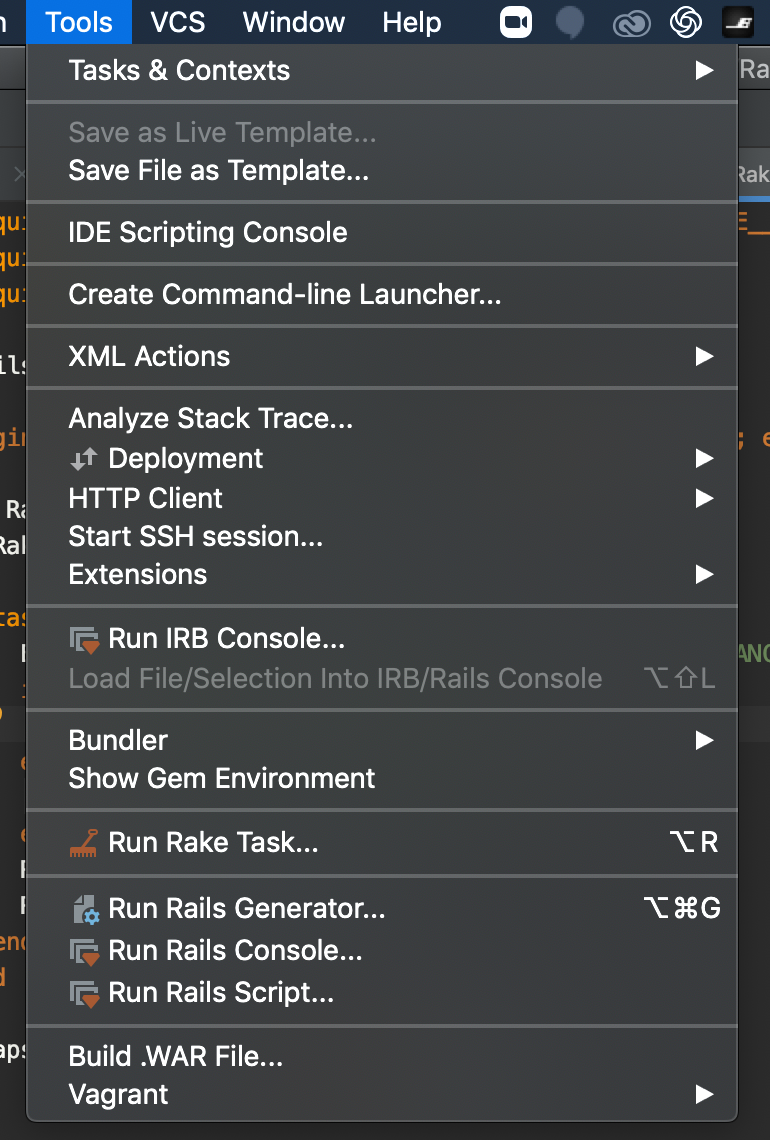
It was always by Run Rails Script etc. I can run from terminal (via bundle exec spork) but would like everything encapsulated in the ide.
请先登录再写评论。
Hello Garrett,
could you please check that all the requirements are met as it stated here:
https://www.jetbrains.com/help/ruby/executing-tests-on-drb-server.html
Hi yes, confirming I have all of that. I can run:
bundle exec spork
bundle exec rspec `/specs/spec_name.rb` --drb
and it executes perfectly from the terminal. I just want the functionality back in RubyMine.
Sorry for such a delay. Unfortunately I didn't manage to get the same behaviour it in the latest RubyMine's versions so it'd be great if you could share a project sample for reproduce.