Wasted UI space
已回答

I use the new DG (2020.1.3) on my 13 inch MacBook 2017 and I have 4 lines that take 105 px out of 900 screen height px total.
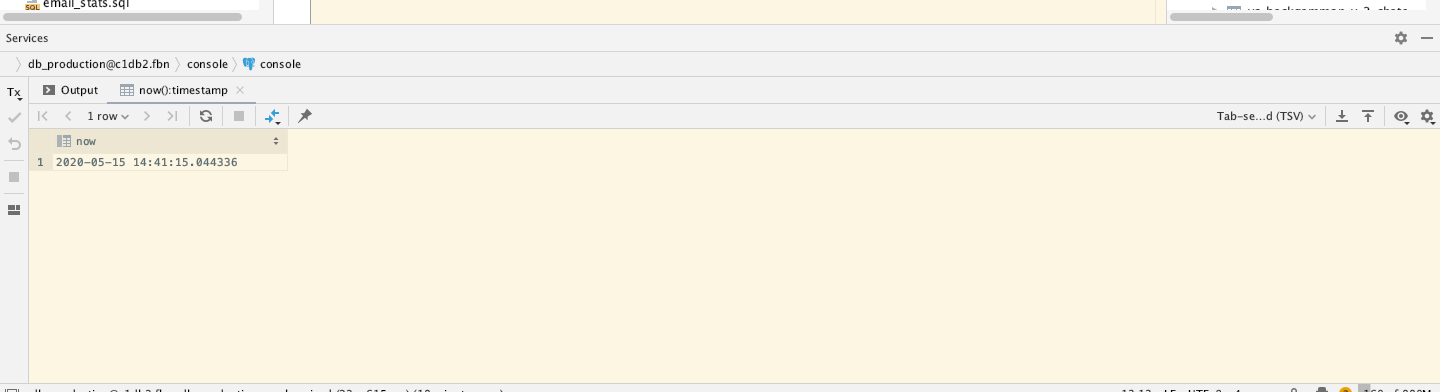
I would like to be able to hide:
* line with 'Services' as it is useless to me. I know that I am in the Services panel
* line with path: it would be better to move it to the line with 'Output' tab or allow to hide completely
* left toolbar: don't need it, too.
DG 2019 was more friendly to my screen space.
请先登录再写评论。
Hello!
* line with 'Services' as it is useless to me. I know that I am in the Services panel
It is now impossible.
* line with path: it would be better to move it to the line with 'Output' tab or allow to hide completely
It is shown only if Services tree is hidden. We assume that everybody needs to navigate between services. But you don't am I right?
* left toolbar: don't need it, too.
It is possible: gear icon - show toolbar.
> We assume that everybody needs to navigate between services. But you don't am I right?
Yes, I don't. I navigate with opened tabs. Anyway, path line could be moved to the Service line to save space, for example. Or to bottom status bar. Or, again, it could have a setting to be hidden. If I open Services tree to hide the bar, I again loose screen space.
You're right, I agree with this. PLease follow the ticket: https://youtrack.jetbrains.com/issue/IDEA-222531