Corrupt Artifact XML

IntelliJ IDEA 2020.2.2 (Ultimate Edition)
Build #IU-202.7319.50, built on September 14, 2020
Runtime version: 11.0.8+10-b944.31 amd64
VM: OpenJDK 64-Bit Server VM by JetBrains s.r.o.
Windows 10 10.0
GC: ParNew, ConcurrentMarkSweep
Memory: 2031M
Cores: 2
Non-Bundled Plugins: MavenRunHelper
Hello,
Since upgrading to Ultimate 2020.2.2 we've had problems with artifact settings getting corrupted in new projects. As a result we've had to manually correct the XML within the .idea/artifacts folder or the Project Structure->Project Settings->Artifacts window.
To give an example for the XML, here is what the correct artifact looks like for us:
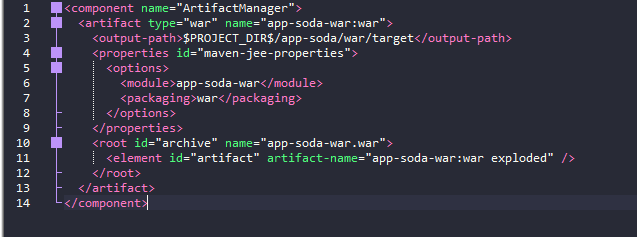
Here is what it looks like after we've created the project and the WebLogic Run Configuration:
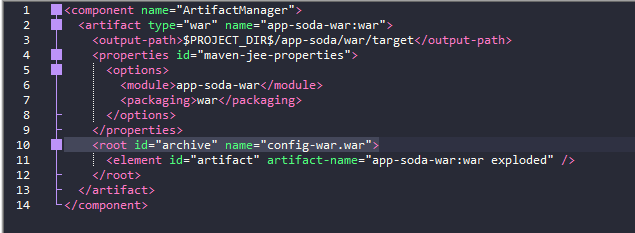
I've highlighted what we have to manually change for each artifact. Left as is, where we to deploy this to WebLogic as it originally is we receive an error that says something like "Cannot find sources for config-war.war" (can't remember the exact verbiage right now)
Again this has not been a problem for us before ver. 2020.2.2
请先登录再写评论。
Is it a Maven/Gradle based project? Do you get these artifacts generated automatically on import or were they configured manually in IntelliJ IDEA?
What are the exact steps to create this project to reproduce the problem?
Serge,
We only do Maven projects. The artifacts are generated automatically every time I start a new workspace and import a Maven project via it's POM.
Steps to recreate:
is the name of the war archive you can see in the artifact configuration:
In case of a maven project IDE creates artifact configuration including the artifact archive name from the Maven pom.xml file. For example it checks the finalName attribute:
Other Maven configuration are also supported.
How do you configure Maven web module? Does this problem started to happen only recently? Can you check it with previous IDE versions (you can download them from https://www.jetbrains.com/idea/download/other.html )