Keyboard shortcut to access sub items in tool window header

Is it possible to navigate tool window header options using keyboard? For example, Microsoft IDEs have SHIFT + ALT option to Move to the current tool window toolbar.
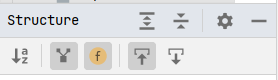
I would like to use keyboard shortcuts or some type of tab navigation to access second options row.
请先登录再写评论。
Hello,
What actions would you expect to be performed? "select opened file", "expand all"? You can navigate a mouse on each sign and there will be a pop-up window with a shortcut hint.
Under the keymap settings https://www.jetbrains.com/help/pycharm/settings-keymap.html you can find a desired shortcut or set your own. Also, see how to learn shortcuts as you work https://www.jetbrains.com/help/pycharm/mastering-keyboard-shortcuts.html#learn-shortcuts