What do the background colors in Project view mean?
已回答

Seriously, what do they mean? Why have some dirs a different color?
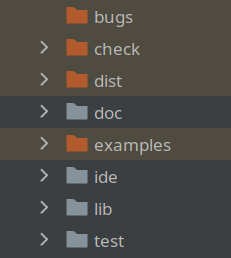
They have certainly no relation with my .gitignore file.
请先登录再写评论。
Those orange folders are marked as Excluded (PyCharm doesn't build indices for them). You can change it by right-clicking the folder and choosing Mark Directory as, if needed.
More info can be found here https://www.jetbrains.com/help/pycharm/project-tool-window.html#content_pane
and here https://www.jetbrains.com/help/pycharm/content-root.html#root_types
Ah, right, thanks! I remember marking them many years ago, but totally forgot about the color.
I am about to post a related question, so I will add this here. What in the OP's Project tab does the tan/yellowish background color (not the orange folder coloring vs blue for example) mean? I hadn't loaded my project in a long time and all of sudden it's all different looking. So I googled example IntelliJ screenshots and did NOT see that coloring. What happened?
Hello Dan Delgado,
Non-Project files are marked with this color. Can be checked under Settings/Preferences | Appearance&Behaviour | File Colors. https://www.jetbrains.com/help/pycharm/settings-file-colors.html