Javascript sourcing outdated external library, invalidate cache doesn't work.

I have created a React project that uses "react-router-dom" as a dependency. I need version 6 at minimum, however Intellij *ignores* what npm installs in node_modules and instead defaults to an *outdated* version in "External Libraries". See here: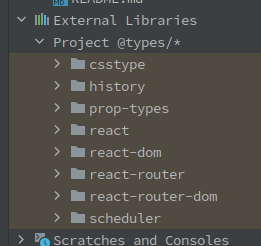 I have deleted the entire cache folder, invalidated cache and restarted, deleted the project and started fresh, and in my project structure no library is explicitly added
Every time I delete this "Project @types/*" folder it comes back within seconds, breaking my project. Can I disable it?
Edit: I downloaded IntelliJ Idea Ultimate to a brand new virtual machine, made a brand new template React project, installed react-router, and it's still 5.3. This is reproducible.

请先登录再写评论。
The IDE downloads typings for some popular libraries to its configuration folder and uses it to enhance code completion. You can remove the auto-downloaded typings from your
<IDE system dir>/javascript/typingsand either disabletypescript.external.type.definitionsRegistry key or removereact-router-domfromtypescript.external.type.definitions.packageskey valueThe Registry can be located via: Help > Find action > type
Registry...Elena Pogorelova that did the trick, thank you!