Multiple Path Mappings and pydev debugger: warning: trying to add breakpoint to file that does not exist: Pycharm 2022.1 Professional Edition

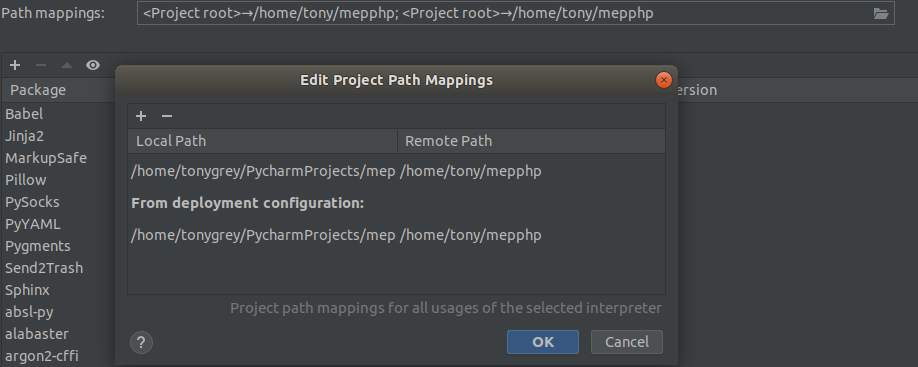
I am getting multiple paths in Path mapping. The code is running in a remote machine. The path mappings two kind of paths. I have attached screenshot of this issue below. Everything else is working fine except the debugger is showing a warning pydev debugger: warning: trying to add breakpoint to file that does not exist:. Can anyone explain why this is happening? I have give the same path in the deployment configuration. I am using Pycharm 2022.1 Professional Edition
请先登录再写评论。
Hi,
One path mapping is automatically taken from the deployment (it's specified during the remote interpreter wizard). Could it be that you added the second mapping manually in the interpreter settings? If so, does it help to just remove it?
I removed the first path and It is working fine. The debugger is showing a warning pydev debugger: warning: trying to add breakpoint to file that does not exist:. This issue still persist.
Could you provide a screenshot of the full error?
Sorry for the delayed reply. Your first screenshot shows the path mappings for the project named `mep`, and the second screenshot shows the project `Hawkes_Process_JAX`. Are you sure the path mappings are specified for this project correctly?
It works fine for me, can't reproduce the issue.
Other than the warning everything else is working fine. This warning only happening in one of my projects named 'mep'. The warning points to another project named 'Hawkes_Process_JAX'. I am just ignoring it now as the rest of the stuff is working fine.
Andrey Resler Thank you for spending time on this issue.