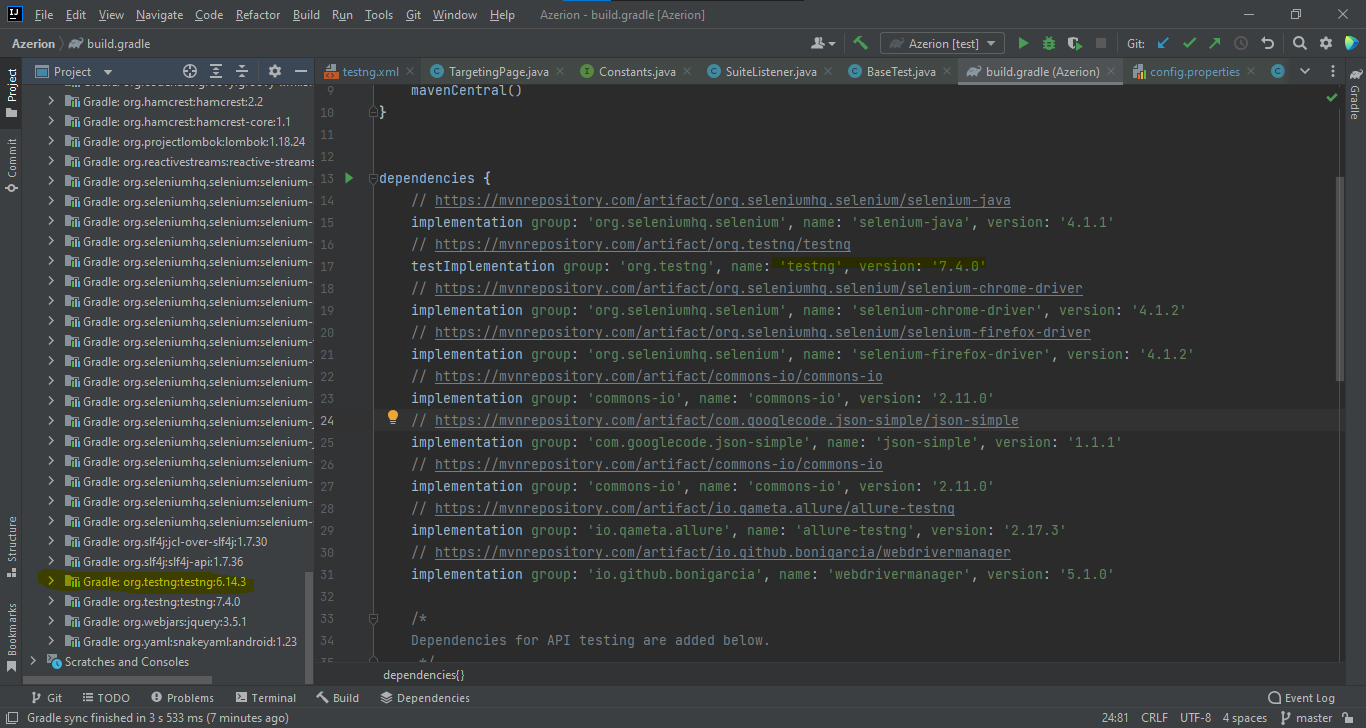
Intellij not deleting testng 6.14.3 library, it keeps autodownload this version every time I load build.gradle

Hello,
Even though I have downloaded new version of testing 7.4.0 in my build.gradle file, but it kept testng 6.14.3. I tried deleting it, remove it form the module it used in. But no matter how many times and how many ways I delete it, intellij keeps auto downloading it as soon as I load build.gradle file.
As a result, screenshot taking feature upon failed test in Selenium, doesn't work because of this testng version.
Please check. Following are my credentials
IntelliJ IDEA 2021.3.2 (Community Edition)
Build #IC-213.6777.52, built on January 28, 2022
Runtime version: 11.0.13+7-b1751.25 amd64
VM: OpenJDK 64-Bit Server VM by JetBrains s.r.o.
Windows 10 10.0
GC: G1 Young Generation, G1 Old Generation
Memory: 2034M
Cores: 4
Non-Bundled Plugins:
com.alibaba.autonavi.qa.testng (1.0)
Docker (213.6777.42)
Kotlin: 213-1.5.10-release-949-IJ6777.52
请先登录再写评论。
Hi - are you sure it is not supplied by any secondary build.gradle files or something?
Try this: close the project, deleting the entire .idea and .gradle folders from its root. In the IDE, go to File | New | Project from existing sources and select your main build.gradle file as a source. This will essentially re-import the whole project and rehash the dependencies.
If it doesn't help, try disabling all 3rd-party plugins, restarting the IDE and doing the above again.