IntelliJ Not saving Gradle options

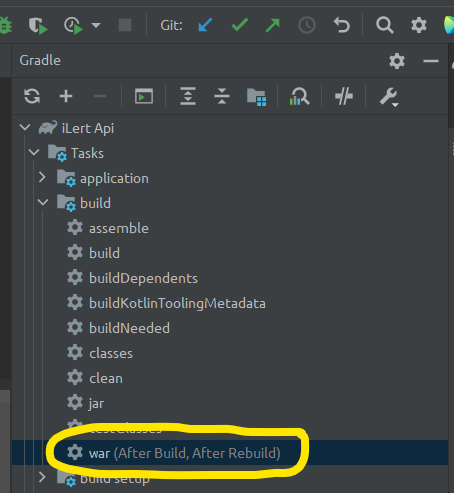
On other projects when I set to build my war after Build and ReBuild it saves the setting - however in my latest It does not, where did I go wrong?
It is just wasting time and is not consistent
I have
IntelliJ IDEA 2022.3 (Ultimate Edition)
Build #IU-223.7571.182, built on November 29, 2022
Runtime version: 17.0.5+1-b653.14 amd64
VM: OpenJDK 64-Bit Server VM by JetBrains s.r.o.
Windows 10 10.0
GC: G1 Young Generation, G1 Old Generation
Memory: 4096M
Cores: 12
Registry:
ide.images.show.chessboard=true
Non-Bundled Plugins:
Batch Scripts Support (1.0.13)
wu.seal.tool.jsontokotlin (3.7.4)
org.jetbrains.settingsRepository (223.7571.203)
com.intellij.plugins.watcher (223.7571.113)
Statistic (4.2.6)
net.antelle.intellij-xcode-dark-theme (1.2.4)
com.intellij.nativeDebug (223.7571.203)
org.jetbrains.plugins.hocon (2022.1.0)
izhangzhihao.rainbow.brackets (2022.3.5)
org.jetbrains.kotlin-js-inspection-pack-plugin (0.0.12)
Kotlin: 223-1.7.20-release-201-IJ7571.182
请先登录再写评论。
It should just work after you configure it for the project. Is this option lost after IDE restart? After a project open? Can you provide a sample project and steps to reproduce, please? For uploading you can use https://uploads.jetbrains.com or any file sharing service.