Editor is not usable

i been using android studio for some time and developed small project with it and have almost no problem..now i use intellij idea 2016.3.2 64bit ide to write java code for solving course material which is 2 small classes and it's definitely unusable..the editor takes much time to print what i'm typing and i think it becomes this slow after i try to run the code..i don't know where is the issue i really like the ide and i'm used to it..i'm surprised cause i developed much larger project with it on android studio..my laptop has 4 gigs of ram and 64bit..i disabled alot of plugins and changed memory but nothing works..could it be my laptop is too old? but then how it works on android studio!..thanks for your help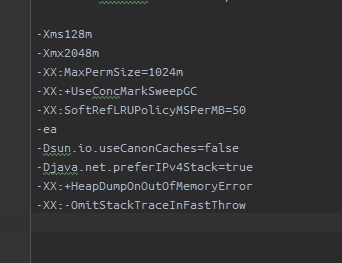
Please sign in to leave a comment.
Switch to JetBrains Runtime: https://intellij-support.jetbrains.com/hc/articles/206544879.
64-bit version can be found at https://bintray.com/jetbrains/intellij-jdk/openjdk8-windows-x64#files.
i think i don't inderstand i already have jdk 64bit i checked it
JetBrains Runtime (OpenJDK from JetBrains) has performance fixes that Oracle JDK doesn't have.
64-bit JDK is not bundled with IDEA, so if you are using 64-bit JDK, it's probably not from JetBrains, hence it has performance issues.
To fix them you can switch to JetBrains JDK. Hope it's clear now.
Current JDK version/vendor can be observed in Help | About dialog. If it's Oracle JDK, you need to switch.
i downloaded this file from the link you gave me and i tried to follow the other link it said i should find 64-bit.exe file but i don't..what should i do to install it? thanks i really appreciate your help so far
See https://intellij-support.jetbrains.com/hc/articles/206544879 for the instructions how to switch the boot JDK.