Text does not fit in text fields on linux.
Answered

Hello, please advise how to fix following problem:
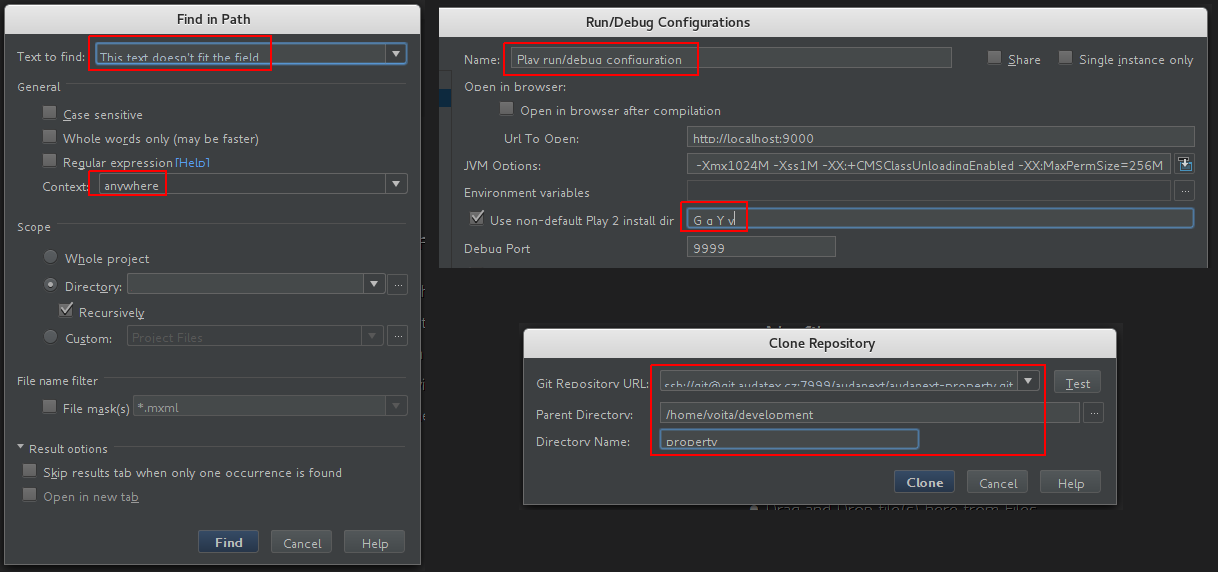
Text in the text field does not fit the field. It looks like the text is padded from top too much and its' bottom half does not fit the field. See form samples on the image below.
Idea 14.1.7, Linux Fedora release 25, desktop Cinnamon version 3.2.7,Oracle JDK 1.8.0_111. Changing themes did not help. Switching to Gnome did not help.
Thank you in advance!
Please sign in to leave a comment.
Try changing IDE font to something different.
Try running on JetBrains JDK: https://bintray.com/jetbrains/intellij-jdk/ (https://intellij-support.jetbrains.com/hc/articles/206544879).
Does it happen with the latest version from http://www.jetbrains.com/idea/download/index.html?
I was able to reproduce the problem with the latest Idea release (ideaIC-2016.3.2.tar.gz) too. But using IntelliJ JDK (jbsdk8u76b216_x86.tar.gz) fixed it for both releases. Thanks!