cryptic icons in Javascript function Ctrl+click

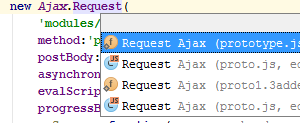
I don't even know how to search for what these are called, but when I Ctrl+click a Javascript function, it shows multiple files where that function resides (yes, the previous developers did this), but I don't know what PHPStorm's cryptic icons mean beside the references, and hovering over them doesn't tell me.
What are these, what are they called, or where do I find this info?
Please sign in to leave a comment.
Hi there,
https://www.jetbrains.com/help/phpstorm/2016.3/symbols.html
I guess it represents what that particular entity is (how it's declared):
Yup, 1 & 3 are "static field"
Static field? On the link, it says just "field"; I don't see "static" anywhere. Where do you see that?
Also, for 2nd and 4th entries, in what context would I be Ctrl+clicking the function call in a .js file that would show the Class icon without the JS on it?
Also, I see icons for Class, Final class, Abstract class, and Test case, but nothing there has the Class icon with the orange JS in the corner.
>Static field? On the link, it says just "field"; I don't see "static" anywhere. Where do you see that?
Look at small overlay icon on the bottom left corner -- in PHP code it represents "static" (method or field in a class -- create such file and have a look at the Structure panel).
I do not know why it's not mentioned on that page -- but it mentioned on similar page for IntelliJ IDEA: https://www.jetbrains.com/help/idea/2016.3/symbols.html
No idea about other stuff.