Unable to remove whitespace from some blank lines

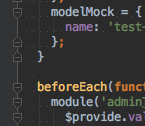
I'm unable to remove whitespace from some blank lines - this is very frustrating, and is causing my code-style tests to fail. I've turned on 'Show Whitespaces', so I can see them, and set 'Strip trailing spaces on Save' to 'all'. Whatever I try I cannot remove the whitespace from these lines - it is always there up to the indentation point. I have also ensured that the 'Keep Indents on Empty Lines' checkbox is not checked.
PhpStorm 10.0.4
OSX 10.11.6
Please sign in to leave a comment.
"Strip trailing spaces on Save" works only for spaces in lines end.
Check if you have "indent code in PHP tags" in PhpStorm | Preferencs | Editor | Code Style | PHP > Other tab.
Thanks for the reply Dmitry. The "indent code in PHP tags" in the PHP code style settings is unchecked - however this is a JavaScript file anyway.
Oh, apologies, I didn't notice whitespaces on blank line a screenshot.
This might be indeed a bug. If you're using PhpStorm you can download EAP build and check if it's fixed there: https://confluence.jetbrains.com/display/PhpStorm/PhpStorm+Early+Access+Program
I'm not sure if I want to start using the EAP version - I'll post on the bug tracker and see if I get any joy - thanks for the suggestion though.
The thing is that you're using outdated version. First of all you'd most likely be asked to check the same on latest version + provide a file copy.
OK, thanks for the info.
I am using WebStorm in version 2019.1.1. I also have this problem. I uncheck "Strip trailing spaces on Save" but it is not helping.
Any update on this.
Thanks,
@Astrotabon, it's not really evident why would you uncheck this option if you need trailing spaces to be removed, you need the option to be set either to
Allor toModified Lines.If it doesn't help, please describe the issue attaching some screenshots and a code sample, I am not sure I get you 100% correct.
Thanks for the quick response. For example, i want to add blank line between those two functions renderMaxTCAM and render, so I hit "return" (on Mac) at line 48, see 1st screenshot.

Then it will become:
You see the error message on line 49 due to the 4 auto-added empty spaces in line 49 (second screenshot). There is no way to delete the 4 spaces. If press the "delete" button, the entire line will be deleted.
Now, in order to add a line, I can only do "copy" and blank line from somewhere else and paste it here. However, if I do auto format via "option" "command" and "L". The 4 empty spaces will come back.
Is there any way to remove the spaces in a blank line?
Thanks,
Bon
Oh I figure out that after I uncheck the box "Keep indents on empty lines", 80% of my trouble goes away. Thanks again.