Error: addAll(Collection<? extends IKlant) in Vector cannot be applied to (Vector<DbObject>)
Answered

IntelliJ gives an error where Eclipse does not.
When I run the program, it works perfectly fine.
A little bit of info:
Our application has objects that will be fetched from a database. These objects have the `DbObject` interface.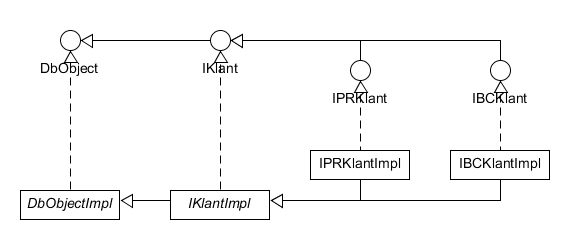
We have two types of Klant (= customer) objects. I'll take `TBCKlantImpl` as an example.
We'll use a method to fetch data from the database. Due to legacy, we'll use Vectors
The method's signature:
public <E extends DbObject, T extends E> Vector<E> getTableObjects(Class<T> c, String where_clause);
I can use it like this:
Vector<IKlant> custs = new Vector<IKlant>();
Vector<IBCKlant> customers = DbVarHolder.get().getTableObjects(TBCKlantImpl.class, "WHERE 1=1 LIMIT 4");
custs.addAll(customers);
No errors here.
But when I use it like this:
Vector<IKlant> custs = new Vector<IKlant>();
custs.addAll(DbVarHolder.get().getTableObjects(TBCKlantImpl.class, "WHERE 1=1 LIMIT 4, 4"));
Now I get an error message.

But the program runs fine with the Eclipse compiler.
Has anyone else experienced this?
Were you able to solve it?
If so, how?
Please sign in to leave a comment.
Please make sure to use the same JDK in IDEA as in Eclipse.Try also 2017.1 version at https://confluence.jetbrains.com/display/IDEADEV/IDEA+2017.1+EAP
If project compiles fine with javac compiler by IntelliJ IDEA reports a error, please file an issue at https://youtrack.jetbrains.com/issues/IDEA with sample project.
Hello Andrey,
Thank you for your reply.
My Eclipse and IntelliJ both use the same JDK. I'll try IntelliJ IDEA 2017.1 soon. (Btw, your link is broken, unfortunately. Gives me a "Page not found".)
I'll let you know how it goes.
>Btw, your link is broken, unfortunately. Gives me a "Page not found"
Thanks, corrected the link.
The new version also has this problem.
I'll proceed to report the issue.
Thanks for your help. :)