Docker Compose problems

Hey,
I'm trying to setup my first Django project using PyCharm and Docker and I've run into some problems. I'm using the cookiecutter-django project to get me started and I'm now trying to get Remote Debugging running by following these instructions: https://github.com/pydanny/cookiecutter-django/blob/master/%7B%7Bcookiecutter.project_slug%7D%7D/docs/pycharm/configuration.rst. My issue now is that I'm missing the option to choose "Docker Compose" when setting up my remote interpreter. I only have the option to use Docker.
I read somewhere in the documentation (EDIT found it: https://www.jetbrains.com/help/pycharm/2016.1/docker-compose.html#d66877e175) that you have to correctly configure Docker under Build, Execution, Deployment > Docker before that option becomes available and I thought I had done that. See screenshot:
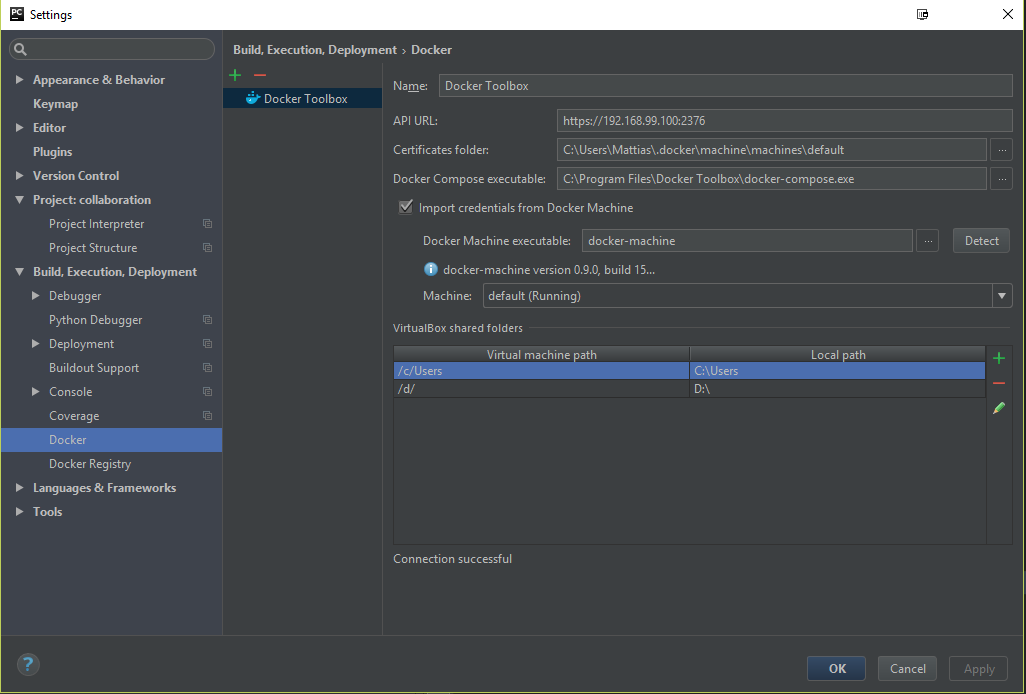
I've tried switching between Docker for Windows (latest) and Docker Toolbox (latest) without any success. I've tried PyCharm 2017.1 EAP and 2016.3 (currently running this) and no change.
This is all I see when setting up the remote interpreter:
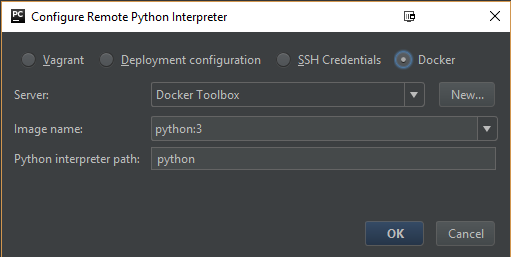
I'm running Windows 10 if anyone's wondering.
What am I missing? Is "Docker Compose" supported on Windows?
Please sign in to leave a comment.
Unfortunately, Docker Compose is not supported on Windows platform, please vote for the corresponding feature request: https://youtrack.jetbrains.com/issue/PY-19251 to increase its priority and be notified about updates.