Webstrome doesn't stop at typescript debug breakpoint

https://github.com/katrina-engelbrecht/webstrombug
hi,
above is my Angular2 project. Actually it is the example code from PrimeNG and I have just add something. I have installed JetBrains IDE Support in Chrome and by debugging es shows in chrome it is connected with webstrome. But it will not stop at the typescript break points. Then I set a breakpoint in typescript's transpiled JS file, in webstrome I can see it is in debugging mode, but it seems like it is stopping at an arbitrary point but not the point I want it to stop. You can try to run this project and see this problem.
Best Regards,
Katrina
Please sign in to leave a comment.
Your project doesn't compile and run. I get multiple compiler errors when building it (with `ng serve`), webpack reports `webpack: Failed to compile`, and page doesn't load because of runtime errors.
Anyway, please see https://blog.jetbrains.com/webstorm/2017/01/debugging-angular-apps/ for instructions on setting up angular-cli debugging in Webstorm. Note that required URL mappings may differ depending on your OS/cli version
Hello Elena,
this program can run by me without any problem. I am new for upload repository in GitHub. Just now I have found that my project hasn't published correctly last night. Now I have published again and I believe this time they are correct as my local project. Pls. try to debug it again.
I have read your blog. My debug setting pls. see the screenshot. But the result is same as I have described in my first thread. Pls. help me to found the reason. Thank you!
Regards
Katrina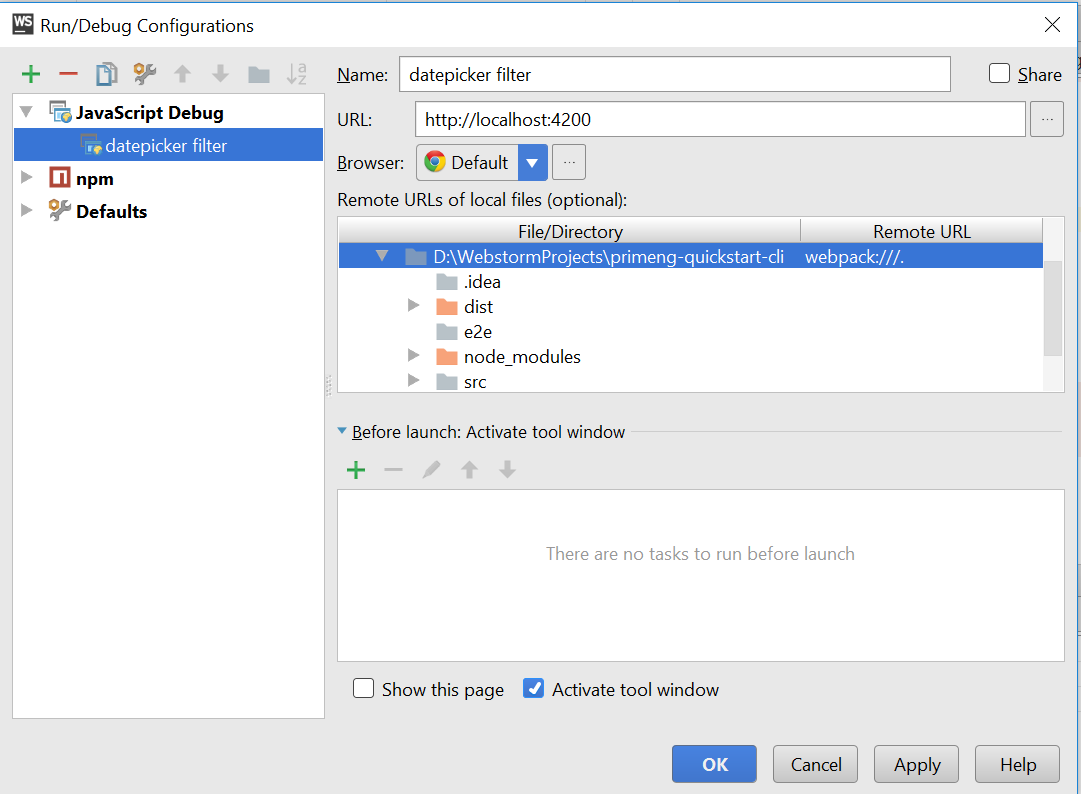
Still the issue with the project currently available on github: on my machine, 'ng serve' fails because of unsupported code constructions in @types\jasmine\index.d.ts. Your local cli version ("angular-cli": "1.0.0-beta.19-3") is rather old, so it's strange that you don't have issues compiling TypeScript 2.1 code. On running your app, I get multiple runtime errors like:
Unhandled Promise rejection: Template parse errors:
'p-header' is not a known element
plus compiler errors.
So I can't check if your remote URL mappings are correct. You need inspecting the generated maps by opening http://localhost:4200/main.bundle.map in browser: search for main.ts there, see what it's path looks like