Can't open IntelliJ on MacOs
Answered

When launching IntelliJ Ultimate (2016.3) I get:
The application “IntelliJ IDEA” can’t be opened.
Tried restarting and reinstalling, for no luck.
Please sign in to leave a comment.
What happens when you run this command in the Terminal?
/Applications/IntelliJ\ IDEA\ CE.app/Contents/MacOS/idea
its did't open and hang also
Please attach the screenshot from the Terminal after running this command.
If it hangs, provide the thread dumps: https://intellij-support.jetbrains.com/hc/articles/206544899 .
after put the command come like this
MACs-MacBook-Pro:~ mac$ /Applications/IntelliJ\ IDEA\ CE.app/Contents/MacOS/idea
2020-03-28 04:25:34.923 idea[48917:327894] allVms required 1.8*,1.8+
2020-03-28 04:25:34.973 idea[48917:327901] Value of IDEA_VM_OPTIONS is (null)
2020-03-28 04:25:34.973 idea[48917:327901] fullFileName is: /Applications/IntelliJ IDEA CE.app/Contents/bin/idea.vmoptions
2020-03-28 04:25:34.973 idea[48917:327901] fullFileName exists: /Applications/IntelliJ IDEA CE.app/Contents/bin/idea.vmoptions
2020-03-28 04:25:34.974 idea[48917:327901] Processing VMOptions file at /Applications/IntelliJ IDEA CE.app/Contents/bin/idea.vmoptions
2020-03-28 04:25:34.982 idea[48917:327901] Done
Error: dl failure on line 542
Error: failed /Applications/IntelliJ IDEA CE.app/Contents/jbr/Contents/Home//lib/server/libjvm.dylib, because dlopen(/Applications/IntelliJ IDEA CE.app/Contents/jbr/Contents/Home//lib/server/libjvm.dylib, 10): no suitable image found. Did find:
/Applications/IntelliJ IDEA CE.app/Contents/jbr/Contents/Home//lib/server/libjvm.dylib: code signature invalid for '/Applications/IntelliJ IDEA CE.app/Contents/jbr/Contents/Home//lib/server/libjvm.dylib'
Failed to LoadJavaVM()
2020-03-28 04:25:34.998 idea[48917:327901] JNI_CreateJavaVM (/Applications/IntelliJ IDEA CE.app/Contents/jbr) failed: 4294967295
MACs-MacBook-Pro:~ mac$
What is your macOS version?
IntelliJ IDEA requires macOS 10.11 or higher. What's your macOS version?
Kmustafiz774 would you please reply to the question above so that we can help you?
Hello , I've installed intellij on my macbook , but when I try to run it , it's like blocked and it's not opening ( I have the same problem with Pycharm )
when I get to : /Applications/IntelliJ\ IDEA\ CE.app/Contents/MacOS/idea :
I don't know what to do exactly in the file
/Applications/IntelliJ IDEA CE.app/Contents/bin/idea.vmoptions
Thankou for helping
Kawtarlulu Kl what is your macOS and IntelliJ IDEA version?
Serge Baranov hello again well my macOS version is 10.10.5 and intelliJ's is the latest one
Kawtarlulu Kl IntelliJ IDEA requires macOS 10.11 or higher. Please update your macOS.
Hi , I've installed intellij 2020.1.2 on my macbook Pro v10.12.6 , but when I try to run it , it's like blocked and it's not opening!!
Please uninstall the crack agent you are using to bypass IntelliJ IDEA licensing. It's added to the .vmoptions file: https://intellij-support.jetbrains.com/hc/articles/206544869.
I bought this Mac no long time,I don't use any Crack, I have a Student licence it's work with WebStorm,
also I can't find this file:
/Users/mohcine/.jetbrains/jetbrains-agent-v3.1.3.0cd4.033
The file is missing, but the VM Option is present, that's why you get the error. See the link in the last reply, find the .vmoptions file and remove the agent line from it.
I download the last Version yesterday, No agent line in .vmoptions: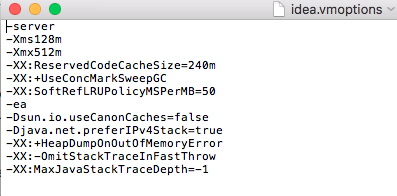
Did you check the .vmoptions file in the config directory? (https://intellij-support.jetbrains.com/hc/articles/206544519).
hi sergio can you help me out. it also wont open for me. I tried this command that you mentioned. I downloaded ultimate. Mac is 10.15.5 and intellij is also up to date.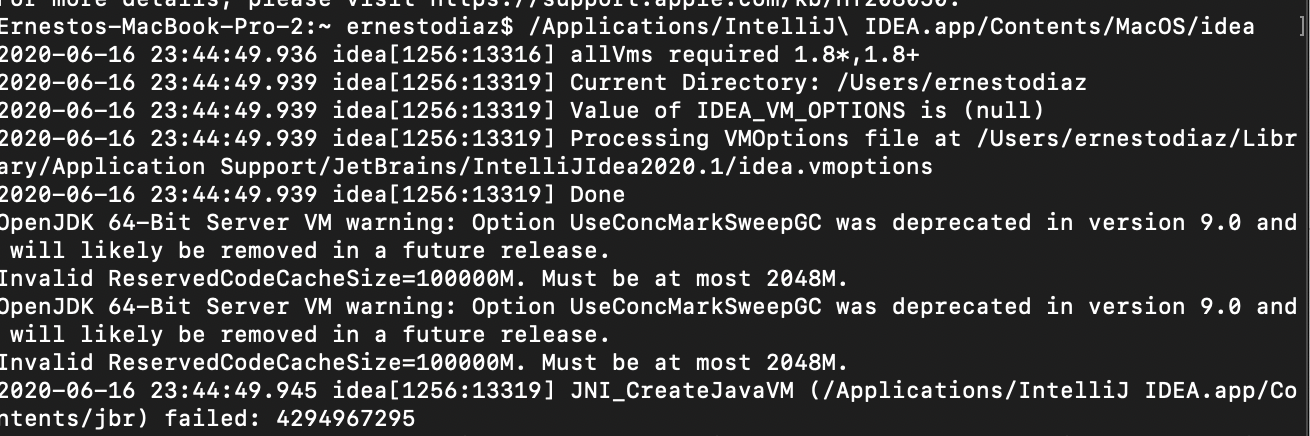
Find the .vmoptions file and either remove it or change change this parameter to -XX:ReservedCodeCacheSize=240m. You can see .vmoptions file path printed in the console.
Hey again sorry for the late response. But it ask for a password when I was searching for the file. I'm not sure what password it asking for.
Ernesto Diaz
No need to use sudo here. Just open the file for editing (for example with the "open -a TextEdit filename" command): https://i.imgur.com/ZsY0UPl.png
hello it said the file does not exist
There should be a space between 2 words (Application\ Support). Backslash is used here to say that space is the part of the path and not a divider between 2 commands.
Please help After installing IntelliJ Ultimate from the dmg. when i try to start it it fails, and i am unable to run the application.
when i run the command from the Terminal i get the following error.
Command -
cd /Applications
./IntelliJ\ IDEA.app/Contents/MacOS/idea
Terminal Message-
allVms required 1.8*,1.8+
2020-12-14 23:15:20.839 idea[4642:401215] Current Directory: /Applications
2020-12-14 23:15:20.840 idea[4642:401215] Value of IDEA_VM_OPTIONS is (null)
2020-12-14 23:15:20.840 idea[4642:401215] Processing VMOptions file at /Users/jukana/Library/Application Support/JetBrains/IntelliJIdea2020.3/idea.vmoptions
2020-12-14 23:15:20.840 idea[4642:401215] Done
OpenJDK 64-Bit Server VM warning: Option UseConcMarkSweepGC was deprecated in version 9.0 and will likely be removed in a future release.
Error opening zip file or JAR manifest missing : /Users/neo/jetbrains-agent.jar
Error occurred during initialization of VM
agent library failed to init: instrument
@... Please remove crack (line with jetbrains-agent.jar) from .vmoptions file (/Users/jukana/Library/Application Support/JetBrains/IntelliJIdea2020.3/idea.vmoption)
Can you please help me? I have downloaded IntelliJ IDEA Community and it can not open. I typed in Terminal
/Applications/IntelliJ\ IDEA\ CE.app/Contents/MacOS/idea and error from Terminal says:
2021-03-30 12:52:29.210 idea[13663:1182420] allVms required 1.8*,1.8+
2021-03-30 12:52:29.219 idea[13663:1182423] Cannot load JVM bundle: Error Domain=NSCocoaErrorDomain Code=3585 "dlopen_preflight(/Applications/IntelliJ IDEA CE.app/Contents/jbr/Contents/MacOS/libjli.dylib): no suitable image found. Did find:
/Applications/IntelliJ IDEA CE.app/Contents/jbr/Contents/MacOS/libjli.dylib: mach-o, but wrong architecture
/Applications/IntelliJ IDEA CE.app/Contents/jbr/Contents/MacOS/libjli.dylib: mach-o, but wrong architecture" UserInfo={NSLocalizedFailureReason=The bundle doesn’t contain a version for the current architecture., NSLocalizedRecoverySuggestion=Try installing a universal version of the bundle., NSFilePath=/Applications/IntelliJ IDEA CE.app/Contents/jbr/Contents/MacOS/libjli.dylib, NSDebugDescription=dlopen_preflight(/Applications/IntelliJ IDEA CE.app/Contents/jbr/Contents/MacOS/libjli.dylib): no suitable image found. Did find:
/Applications/IntelliJ IDEA CE.app/Contents/jbr/Contents/MacOS/libjli.dylib: mach-o, but wrong architecture
/Applications/IntelliJ IDEA CE.app/Contents/jbr/Contents/MacOS/libjli.dylib: mach-o, but wrong architecture, NSBundlePath=/Applications/IntelliJ IDEA CE.app/Contents/jbr, NSLocalizedDescription=The bundle “OpenJDK 11.0.10” couldn’t be loaded because it doesn’t contain a version for the current architecture.}
@... It looks like you download M1 CPU version of the IDE instead of the Intel version. Please download IDE for Intel from https://www.jetbrains.com/idea/download:
Please provide the console log from the Intel version if it still doesn't work.
Thank u so much, now it works!
/Applications/IntelliJ\ IDEA\ CE.app/Contents/MacOS/idea
2021-07-30 01:27:35.551 idea[14028:1222226] allVms required 1.8*,1.8+
2021-07-30 01:27:35.552 idea[14028:1222229] Current Directory: /Applications/IntelliJ IDEA CE.app/Contents/MacOS
2021-07-30 01:27:35.552 idea[14028:1222229] Value of IDEA_VM_OPTIONS is (null)
2021-07-30 01:27:35.552 idea[14028:1222229] fullFileName is: /Applications/IntelliJ IDEA CE.app/Contents/bin/idea.vmoptions
2021-07-30 01:27:35.552 idea[14028:1222229] fullFileName exists: /Applications/IntelliJ IDEA CE.app/Contents/bin/idea.vmoptions
2021-07-30 01:27:35.552 idea[14028:1222229] Processing VMOptions file at /Applications/IntelliJ IDEA CE.app/Contents/bin/idea.vmoptions
2021-07-30 01:27:35.553 idea[14028:1222229] Done
Error occurred during initialization of VM
java.lang.NoSuchMethodError: 'void com.intellij.util.lang.UrlClassLoader.<init>(com.intellij.util.lang.UrlClassLoader$Builder, java.util.function.Function, boolean)'
at com.intellij.util.lang.PathClassLoader.<init>(PathClassLoader.java:50)
at jdk.internal.reflect.NativeConstructorAccessorImpl.newInstance0(java.base@11.0.11/Native Method)
at jdk.internal.reflect.NativeConstructorAccessorImpl.newInstance(java.base@11.0.11/NativeConstructorAccessorImpl.java:62)
at jdk.internal.reflect.DelegatingConstructorAccessorImpl.newInstance(java.base@11.0.11/DelegatingConstructorAccessorImpl.java:45)
at java.lang.reflect.Constructor.newInstance(java.base@11.0.11/Constructor.java:490)
at java.lang.ClassLoader.initSystemClassLoader(java.base@11.0.11/ClassLoader.java:1978)
at java.lang.System.initPhase3(java.base@11.0.11/System.java:2074)