How to disable non-real whitespaces?

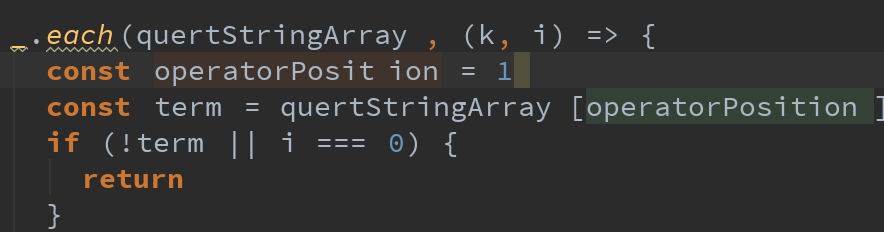
Please see the attached image. In the second line, operaterPosition is the variable name but the editor inserts an imaginary whitespace when I move the caret on it. Also, on the third line, there is no space between quertStringArray and [ , but the it puts an imaginary one there. How do I turn this function off? Thank you.
Please sign in to leave a comment.
there is no such feature in WebStorm - it never puts 'imaginary' white spaces, all them are real
What font is that? Try different font instead.
Hi Elena
I didn't have whitespace at the two places I mentioned, so I think maybe it's the IDE format it visually in a way that's easier to read? I understand that there's no whitespace characters inserted. I guess it's more like a display option?
there are no such display options - formatting is always 'real' (except for 'soft wraps').
As @Andriy mentioned, this may be specific to the font being used
Thanks, Elena and Andriy,
Yes, I fixed it by changing to the right font. I was using "Source Code Pro" which had the problem. Changing to "Source Code Pro for Powerline" fixed the problem. Thanks again!.