How to make tab/cursor placement not suck in blade files? (2017.1 still, but 2016.3 and down also..)

Really trying to get the hang of this editor but the way it handles where it puts your cursor is driving me up a freaking wall. It's so backwards to me when compared to things like ST3 or Atom.
Let's say I type out this...

and I hit enter... it puts my cursor here...
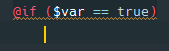
Which I guess is fine, because it's expecting me to put something inside the if statement. However when I hit backspace (let's say to close the if) it moves my cursor all the way back to where it was in the first image. This wouldn't be a problem if it was smart enough to move the @endif when I type it. If I type an @endif I end up with this...
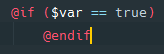
So my only options are to use the arrow keys before typing @endif, or after typing @endif, hit home and then backspace now that it's typed. Why in 2017.1 is it not smart enough to put my @endif in the right spot.
Is there some setting I'm missing that will make the cursor placement not so stupid in blade files? I've tried every combination of the few checkboxes in coding style. I'm looking for some setting like "When I hit backspace, delete a tab, don't go to the end of the previous line." or just some way to not require so many extra keystrokes over typing the same thing in Atom.
Even if I type it all in the correct order, the if statement, then the content, and then hit enter... it requires extra keystrokes to correctly align the @endif.
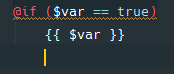
If I hit backspace there, it should go back to where the @if aligns, and let me type an @endif. Instead it puts my cursor after {{ $var }}.
Does anyone else think this is crazy broken, or is there some setting I'm missing?
I think when I type @if and hit tab it should maybe make an @endif like it does when you make <div>'s or other html tags, then when you hit enter it'll auto align them and put your cursor in the middle.
Also when I type @php in a blade file and I hit tab it turns it into @php() (even though the autocomplete dropdown claims it will just be @php) which is also broken as it's just @php and @endphp.
Trying to love this editor, but if I can't get blade files to behave I may just stick to Atom till phpstorm has better Blade support.
Please sign in to leave a comment.
Noticed more issues... indenting/tab placement works completely different if you use an @php in a blade file. Always tries to put your cursor aligned with the @php.
Obviously when hitting enter after the { it should align itself with the if. This just continues for anything you try to do inside of a @php tag.
Hi there,
I'm commenting on Backspace behaviour only:
Settings/Preferences | Editor | general | Smart Keys --> Backspace | Unindent -- choose another option (e.g. "To nearest indent position") -- should help.
Thanks! That makes things a lot more tolerable! I knew there had to be some buried option somewhere. Although I'd argue that "proper indent position" was being incorrect haha. To nearest indent position works a lot smarter in blade files.
Now if only we could do something about the buggy @php tag support in Blade.