Intellij Idea 2017.1 not seeing mapped network drives
Answered

In previous version of Intellij and in android studio I was able to see and open my network drives.
Since installing Intellij Idea 2017.1 I can no longer open them...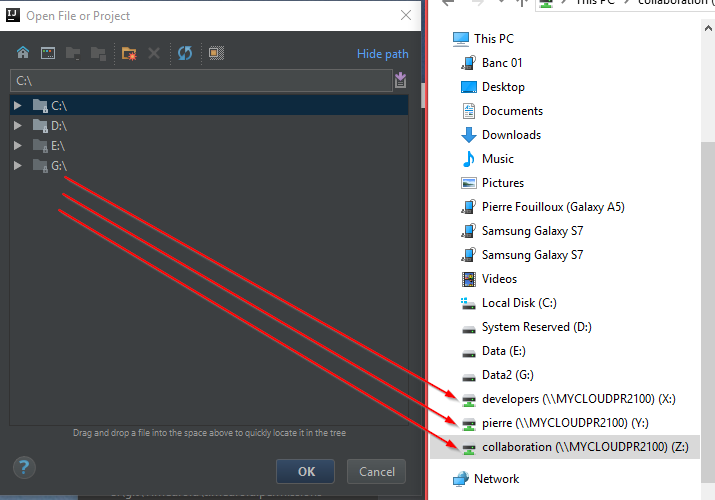
Any idea what could be going wrong?
Please sign in to leave a comment.
It could be the permissions issue, do you start IntelliJ IDEA as the normal user or as Administrator? Were the drives mounted as the normal user or as Administrator?
Thanks for the quick reply! :)
I usually run Intellij as administrator, but created the drives as normal user.
I have now run intellij as normal user and I can see them.
Weird... I would have expected that a program running as administrator would have permission to see drives created as normal user.
Can you recommend a way to create the mappings so that they would be visible to the administrator?
Or perhaps I should avoid running Intellij as admin?
It's a Windows feature so that mapped drives are visible only to the user that has mapped them. I have a batch script to map the drives that is called from the Task Scheduler via 2 different tasks, one task has "Run with highest privileges" checkbox enabled, the other doesn't have it. This way my network drives are visible to all the apps no matter if they are started as Administrator or not.
Running "net use..." from the Administrator command line prompt would also work.
I would not run IntelliJ IDEA as Administrator anyway.