Mounted folders not showing when I use File, Settings, 'Build Execution Deployment', Deployment

I just upgraded to 2017.1.2 and the mounted folders are not showing when I use File, Settings, 'Build Execution Deployment', Deployment.
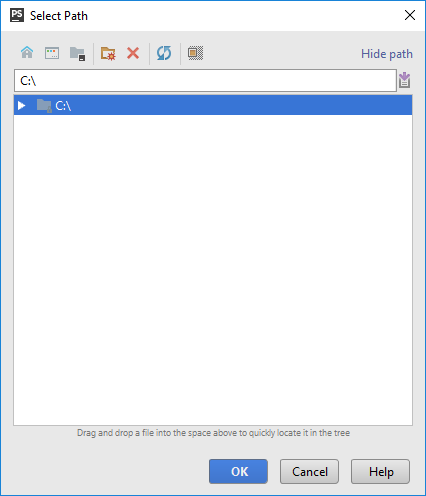
I click the '...' by the 'Folder:' and all I get is C:\
In my 2016 version I had C:\ and all of my other mapped drives listed.
Please sign in to leave a comment.
Try to open a mounted drive in Explorer and then switch to IDE, open that window, click Refresh - see if the drive is there.
Opened fine in Explorer, Switched to PhpStorm, drilled down to the window to select a folder to be used as a mounted folder and it still just shows C:\. No other drives are displayed. Works fine in my 2016 version. I just noticed when I started using 2017 yesterday that I was getting 'Specified path cannot be found' in all of my projects.
How did you upgrade to 2017.1? Was it via patch or by downloading full installer?
If patch -- try removing 2017.1 and install it again via full installer.
I did a full install.
No other ideas.
But I assume that:
1) You have restarted your computer since then?
2) If you launch PhpStorm as Administrator it will show you the mounted drives?
I was running this C:\Program Files\JetBrains\PhpStorm 2017.1.2\bin\phpstorm64.exe and not seeing the mapped drives.
Running it this way seems to work
C:\Program Files\JetBrains\PhpStorm 2017.1.2\bin\phpstorm.bat
Strange... this is happening for me in the new 2017.3 ... using the .bat file works for me as well but leaves a command prompt window hanging out in the backround
Hi, I'm working on a windows computer and I've just encounter the same problem with the 2019.3.3 version of phpstorm. It was working fine last Friday and yesterday the mounted drives had disappeared.
I tried several things including :
Using phpstorm.bat works but I would like to just launch it through the toolbox and not have the command prompt in the background.
Using the command "subst" in the command prompt launch as Administrator also worked but after a simple reboot I have to do it again (and I have several mounted drives so it's really annoying).
Other programs can see the mounted drives though (they seem to use explorer and explorer can see them, so, seems logical).
Can anyone help me with this issue ?
That's a new issue in 2019.3: https://youtrack.jetbrains.com/issue/IDEA-227977. Feel free to vote for or comment it in order to get notified about its updates.