"smart indent pasted lines" removes tabs in docstring
Answered

I use a live template for adding new functions along with the format of docstring our group uses.
I've noticed that in 2016.2 and 2017.1.2 when I copy/paste the docstring, the pasted version has stripped out the blank lines with tabs in them.
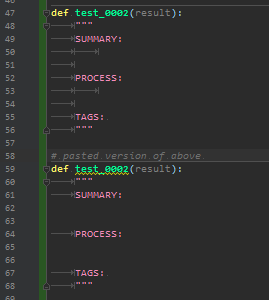
Anyone else see this and/or now how to fix it?
Please sign in to leave a comment.
Hi Marcel.
Yes, you're right, and this problem, indeed, seems to has existed for a few releases already. I've created an issue about it in our tracker. You can use "Paste Simple" as a workaround for such cases for the time being, if you want to leave "Smart indent pasted lines" enabled overall.